5种方式,Ergo应用程序开发因Appkit而永远改变
2019年12月3日

Ergo Appkit是一个用于基于GraalVM的Ergo应用程序的多语言开发库。GraalVM有许多优秀的用例。在本文中,我们将介绍一些从GraalVM继承的Appkit特性,并逐步教您如何利用它们。
- 0. 示例场景
- 1. Java Ergo应用开发
- 2. 低占用、快速启动的Ergo应用
- 3. 用JavaScript、Python、Ruby开发Ergo应用
- 4. Ergo本地共享库
- 5. 调试您的多语言Ergo应用
示例场景
我们将创建一个简单的控制台应用程序(称为FreezeCoin)在Java中使用Appkit库。通过使用Appkit,我们将能够轻松地以编程方式向Ergo节点发送新交易。该交易将把一定数量的Erg转移到一个新的箱子中,该箱子由以下用ErgoScript编写的Ergo合约保护(请参见此introduction和更多高级示例以了解更多关于ErgoScript的信息)。
// 冻结合约
{
  // 参数
  // freezeDeadline: Int - 未来某个区块号,超过该区块后箱子可以被花费
  // ownerPk: SigmaProp - 新箱子所有者的公钥
  sigmaProp(HEIGHT > freezeDeadline) && ownerPk
}
简而言之,一个箱子(因此箱子内的资金)在Ergo区块链上被锁定在一个合约(或脚本)下。为了花费该箱子,合约必须评估为真。因此,想要花费该箱子的人必须确保合约根据其中编码的逻辑评估为真。
我们上面的Freezer合约在允许箱子被花费之前检查以下条件:
-
Ergo区块链的当前区块号(即区块链高度)大于指定的截止日期
-
花费交易必须由与ownerPk公钥对应的秘密密钥的所有者签名。
第一个条件禁止任何人在Ergo区块链增长到给定高度之前花费该箱子。由于区块链上的新区块平均每2分钟开采一次,因此使用当前区块链高度很容易定义我们希望的任何延迟持续时间,例如1天、1周或1个月。(即(60 / 2) * 24 * 7 = 5040,这是每周的区块数).
接下来,我们将深入探讨如何将此Freezer合约与Appkit库集成,以创建FreezeCoin控制台应用程序,以便任何人都可以选择冻结他们的硬币(当然,这个合约/dApp实际上并没有用处,但它是一个有效的简单示例,展示了这个技术栈的工作原理,以便您自己可以在将来构建有用的dApps)。
1. Java Ergo应用开发
Appkit旨在提供一组可以在Java中以习惯用法使用的接口。如果您是Java老手,使用Appkit会让您感到如鱼得水。
如果您希望重现下面的示例,请遵循GraalVM和Appkit的设置说明。
要在我们的FreezeCoin Java实现中使用Appkit,我们必须在gradle文件中添加以下依赖项。
dependencies {
    implementation("org.ergoplatform", "ergo-appkit_2.12", "3.1.0", "compile")
    ...
}
此外,在运行时,Appkit/我们的应用程序需要通过REST API连接到Ergo节点。通常,节点将在本地运行,并在http://localhost:9052/提供。这是任何通过遵循这些说明设置完整节点并使用默认配置的人的标准场景。
因此,我们将假设您已设置并启动了Ergo节点,以便可以测试该应用程序。
接下来,我们的应用程序需要知道如何连接到我们本地运行的节点,以及其他各种设置,以便正常运行。我们将使用一个json文件,其中包含我们的FreezeCoin应用程序在启动时加载的以下配置参数。
{
  "node": {
    "nodeApi": {
      "apiUrl": "http://localhost:9052/",
      "apiKey": "在节点设置期间生成的秘密apiKey"
    },
    "wallet": {
      "mnemonic": "用于初始化或恢复节点钱包的助记词",
      "password": "您选择的保护钱包的密码",
      "mnemonicPassword": "您选择的保护助记词的密码"
    },
    "networkType": "TESTNET"
  },
  "parameters": {
    "newBoxSpendingDelay": "30",
    "ownerAddress": "3WzR39tWQ5cxxWWX6ys7wNdJKLijPeyaKgx72uqg9FJRBCdZPovL"
  }
}
这里apiKey是API身份验证所需的秘密密钥,可以按照这里的描述获取。
您的助记词是您在新钱包设置期间获得的秘密短语。
我们的应用程序的工作方式是,用户将从命令行启动它并提供一个参数。这个参数是他们希望在我们上面编写的Freezer合约下冻结/锁定的价值(以NanoErgs为单位)。
我们FreezeCoin应用程序的第一步将是读取我们刚刚创建的配置json文件,并接受用户的命令行参数:
public static void main(String[] args) {
    long amountToSend = Long.parseLong(args[0]);  // 正值,单位为NanoErg
    ErgoToolConfig conf = ErgoToolConfig.load("freeze_coin_config.json");
    // 下面讨论的其余代码
    ...
}
通过这些获取,我们现在可以获得在json配置文件中定义的花费延迟和所有者地址。
  int newBoxSpendingDelay = Integer.parseInt(conf.getParameters().get("newBoxSpendingDelay"));
  Address ownerAddress = Address.create(conf.getParameters().get("ownerAddress"));
接下来,我们需要从我们的Java应用程序连接到正在运行的Ergo节点,以便我们可以使用刚刚解析的数据并在链上发布内容。这是通过创建一个ErgoClient实例来完成的,该实例使用我们从json配置文件中预定义的节点值。
ErgoNodeConfig nodeConf = conf.getNode();
ErgoClient ergoClient = RestApiErgoClient.create(nodeConf);
现在我们有了ErgoClient的实例,我们可以执行任何代码块,并访问当前的区块链上下文。
String txJson = ergoClient.execute((BlockchainContext ctx) -> {
    // 在这里使用ctx创建并签署新交易
    // 然后将其发送到节点
});
传递给execute的lambda在从Ergo节点加载当前区块链上下文时被调用。在这个lambda中,我们将放置我们的应用程序逻辑。
首先,我们从一些辅助步骤开始。
// 访问嵌入在Ergo节点中的钱包
// (使用我们在freeze_coin_config.json中指定的助记词)
ErgoWallet wallet = ctx.getWallet();

// 计算我们需要发送到新箱子的NanoErgs总量
// 包括支付交易费用
long totalToSpend = amountToSend + Parameters.MinFee;

// 请求钱包中覆盖所需NanoErgs数量的未花费箱子
Optional<List<InputBox>> boxes = wallet.getUnspentBoxes(totalToSpend);
if (!boxes.isPresent())
    throw new ErgoClientException(
        "您指定的钱包中没有足够的硬币来支付 " + totalToSpend, null);

// 创建一个“证明者”,这是一个特殊对象,将用于签署交易
// 证明者应配置您的钱包秘密,这是生成签名(即证明)所必需的
ErgoProver prover = ctx.newProverBuilder()
    .withMnemonic(
            nodeConf.getWallet().getMnemonic(),
            nodeConf.getWallet().getPassword())
    .build();
此时,我们已经选择了用于我们的花费交易的输入箱子,但我们现在需要创建一个输出箱子,指定amountToSend并在Freezer合约下锁定。
// 创建交易的唯一方法是使用从上下文中获得的tx构建器
// 构建器使用上下文访问必要的区块链数据。
UnsignedTransactionBuilder txB = ctx.newTxBuilder();

// 使用从交易构建器获得的新构建器创建新箱子
// 在这种情况下,我们从Freezer ErgoScript代码编译一个新的ErgoContract
OutBox newBox = txB.outBoxBuilder()
        .value(amountToPay)
        .contract(ctx.compileContract(
                ConstantsBuilder.create()
                        .item("freezeDeadline", ctx.getHeight() + newBoxSpendingDelay)
                        .item("ownerPk", ownerAddress.getPublicKey())
                        .build(),
                "{ sigmaProp(HEIGHT > freezeDeadline) && ownerPk }"))
        .build();
请注意,为了从Freezer脚本源代码编译ErgoContract,compileContract方法要求我们提供在脚本中使用的命名常量的值。如果没有使用这样的常量,则可以传递ConstantsBuilder.empty()。
在这种情况下,我们将新箱子所有者的公钥传递到脚本中的ownerPk占位符中。重申一下,这意味着该箱子只能由相应秘密密钥的所有者花费。
接下来,我们使用到目前为止收集的所有数据创建一个未签名的交易。
// 向交易构建器提供我们将要花费的箱子、应创建的输出、总交易费用以及要发送变更的地址
UnsignedTransaction tx = txB.boxesToSpend(boxes.get())
        .outputs(newBox)
        .fee(Parameters.MinFee)
        .sendChangeTo(prover.getP2PKAddress())
        .build();
最后我们:
- 使用证明者签署构建的交易
- 从而获得
SignedTransaction实例 - 使用区块链上下文将签名的交易发送到Ergo节点。
生成的txId可以用于稍后引用此交易,但我们在这里不使用它。
SignedTransaction signed = prover.sign(tx);
String txId = ctx.sendTransaction(signed);
return signed.toJson(true);
正如您所注意到的,对于我们的最后一步,我们展示了将签名交易序列化为Json字符串并启用漂亮打印的可能性。请查看示例的完整源代码以获取更多详细信息,并将其用作您自己应用程序的模板。
现在,所有代码都已确定,我们可以使用以下步骤运行我们的FreezeCoin应用程序(假设您在克隆ergo-appkit-examples的目录中)。
$ pwd
the/directory/you/cloned/ergo-appkit-examples
$ ./gradlew clean shadowJar
这将组装包含我们的FreezeCoin Java应用程序及其所有依赖项的build/libs/appkit-examples-3.1.0-all.jar文件,形成一个单一的fat jar。
请注意,在对我们应用程序的Java源代码进行任何更改后,必须重复此步骤。
创建了我们的应用程序后,我们现在可以使用我们的FreezeCoin应用程序:
$ java -cp build/libs/appkit-examples-3.1.0-all.jar \
      org.ergoplatform.appkit.examples.FreezeCoin  1000000000
您将获得类似于此控制台输出的内容。
因此,您的交易已被Ergo节点接受并广播到网络中,等待在交易池中被添加到区块中。一旦矿工选择并将其添加到区块中,您的硬币将根据您提供给FreezeCoin应用程序的值在新创建的箱子中正式“冻结”。
该示例假设Ergo节点(及嵌入式钱包)由FreezeCoin用户拥有。然而,这并不是严格要求的,Appkit接口可以用于使用任意公共Ergo节点创建和发送新交易。
2. 低占用、快速启动的Ergo应用
如您所知,使用Java进行短期运行的进程有很多缺点。应用程序往往会遭受较长的启动时间和相对较高的内存使用。
让我们使用时间命令运行FreezeCoin,以获取整个程序从开始到结束所需的真实(墙钟经过时间)。我们使用-l标志来打印内存使用情况。
$ /usr/bin/time -l java -cp build/libs/appkit-examples-3.1.0-all.jar \
   org.ergoplatform.appkit.examples.FreezeCoin 1000000000
...
       4.97 real         8.41 user         0.69 sys
 513703936  maximum resident set size
         0  average shared memory size
         0  average unshared data size
         0  average unshared stack size
    125010  page reclaims
      1216  page faults
         0  swaps
         0  block input operations
         0  block output operations
        13  messages sent
        86  messages received
         1  signals received
      2384  voluntary context switches
     17409  involuntary context switches
如上所示,这个小应用程序几乎花费了4秒钟来运行2个并行线程。大部分时间可以归因于JVM启动和后台JIT编译器的运行。这是相当低下的性能,我们知道我们可以做得更好。
幸运的是,GraalVM为我们提供了完美的解决方案。
我们可以通过将Java代码提前编译为本地可执行映像来解决JVM的固有问题。这跳过了在运行时使用Java即时编译器的需要。
对于我们(使用GraalVM的开发者)来说,体验与传统编译器(如gcc)非常相似。请注意,我们可能需要先运行./gradlew clean shadowJar。
$ ./gradlew clean shadowJar
$ native-image --no-server \
 -cp build/libs/appkit-examples-3.1.0-all.jar\
 --report-unsupported-elements-at-runtime\
  --no-fallback -H:+TraceClassInitialization -H:+ReportExceptionStackTraces\
   -H:+AddAllCharsets -H:+AllowVMInspection -H:-RuntimeAssertions\
   --allow-incomplete-classpath \
    --enable-url-protocols=http,https org.ergoplatform.appkit.examples.FreezeCoin freezecoin
[freezecoin:3133]    classlist:  35,217.78 ms
[freezecoin:3133]        (cap):   6,063.07 ms
[freezecoin:3133]        setup:   8,268.99 ms
[freezecoin:3133]   (typeflow):  60,238.25 ms
[freezecoin:3133]    (objects):  33,009.06 ms
[freezecoin:3133]   (features):   4,796.86 ms
[freezecoin:3133]     analysis: 102,876.01 ms
[freezecoin:3133]     (clinit):  11,642.43 ms
[freezecoin:3133]     universe:  13,718.96 ms
[freezecoin:3133]      (parse):   5,053.18 ms
[freezecoin:3133]     (inline):  18,317.24 ms
[freezecoin:3133]    (compile):  44,806.82 ms
[freezecoin:3133]      compile:  72,288.24 ms
[freezecoin:3133]        image:   7,955.29 ms
[freezecoin:3133]        write:   2,872.25 ms
[freezecoin:3133]      [total]: 243,813.30 ms
上述简单命令生成了一个完整的本地可执行文件,名为freezecoin。
强调一下,这个可执行文件不仅仅是JVM的启动器。实际上,它不链接到JVM或以任何方式捆绑JVM。native-image将FreezeCoin代码以及它所依赖的任何Java库编译为简单的机器代码。
如果我们查看freezecoin使用的库,您会发现它仅使用标准系统库。因此,我们可以将这个可执行文件移动到另一个没有安装JVM的系统上,它将在那里正常运行。
$ otool -L freezecoin    # 在Linux上使用ldd freezecoin
freezecoin:
	/usr/lib/libSystem.B.dylib (compatibility version 1.0.0, current version 1252.50.4)
	/System/Library/Frameworks/CoreFoundation.framework/Versions/A/CoreFoundation (compatibility version 150.0.0, current version 1455.12.0)
	/usr/lib/libz.1.dylib (compatibility version 1.0.0, current version 1.2.11)
如果我们对这个新的freezecoin可执行文件进行计时,我们可以看到它的启动速度大约快8倍,并且使用的内存少了约6倍。这意味着您不会感受到在使用JVM运行短期程序时总是会出现的明显暂停。
$ DYLD_LIBRARY_PATH=$GRAAL_HOME/jre/lib /usr/bin/time -l ./freezecoin 1800000000
        0.43 real         0.15 user         0.03 sys
  81289216  maximum resident set size
         0  average shared memory size
         0  average unshared data size
         0  average unshared stack size
     20079  page reclaims
         0  page faults
         0  swaps
         0  block input operations
         0  block output operations
        13  messages sent
        86  messages received
         0  signals received
        11  voluntary context switches
       138  involuntary context switches
这只是GraalVM的一个伟大好处,我们可以通过Appkit利用它。
3. 用JavaScript、Python、Ruby开发Ergo应用
GraalVM支持所谓的多语言编程,其中应用程序的不同组件可以使用最合适的语言进行开发,然后在运行时无缝结合在一起。通过这种方式,使用Java编写的独特库可以在用JavaScript编写的node.js应用程序中使用。
为了支持多语言编程,GraalVM平台拥有自己高性能的流行语言实现。我们将利用这一点来展示我们的FreezeCoin示例项目,以向您展示使用您首选语言是多么简单。
在运行下面的示例(JavaScript、Python和Ruby)之前,请确保您在本地成功运行了Java版本的FreezeCoin,以确保一切设置正确。
JavaScript
GraalVM可以运行JavaScript和Node.js应用程序。它与ECMAScript 2019规范兼容。此外,js和node启动器接受特殊的--jvm和--polyglot命令行选项,允许JS脚本访问Java对象和类。
鉴于此,FreezeCoin的JS实现可以使用Appkit API接口轻松编写。
请查看FreezeCoin JS实现的完整源代码以获取详细信息。
以下命令使用node启动器执行FreezeCoin.js脚本。
$ node --jvm --vm.cp=build/libs/appkit-examples-3.1.0-all.jar \
  js-examples/FreezeCoin.js  1000000000
请注意,命令中的路径相对于ergo-appkit-examples项目目录的根目录。
Python
GraalVM可以运行Python脚本,尽管Python实现仍处于实验阶段(有关详细信息,请参见兼容性部分)。
FreezeCoin的Python示例可以使用以下命令执行
$ graalpython --jvm --polyglot --vm.cp=build/libs/appkit-examples-3.1.0-all.jar \
   python-examples/FreezeCoin.py 1900000000
Ruby
GraalVM可以运行Ruby脚本,使用TruffleRuby实现,但仍处于实验阶段(有关详细信息,请参见兼容性部分)。
TruffleRuby旨在与标准Ruby实现MRI版本2.6.2完全兼容。
FreezeCoin的Ruby示例可以使用以下命令执行
$ truffleruby --polyglot --jvm --vm.cp=build/libs/appkit-examples-3.1.0-all.jar \
    ruby-examples/FreezeCoin.rb 1900000000
4. Ergo本地共享库
GraalVM的另一个伟大好处是,我们可以将Java类编译为本地共享库,而不是可执行文件。
为此,我们声明一个或多个静态方法为@CEntryPoint。
public class FreezeCoin {
    ...
     /**
     * 可从C调用的入口点,包装{@link FreezeCoin#sendTx}
     */
    @CEntryPoint(name = "sendTx")
    public static void sendTxEntryPoint(
            IsolateThread thread,
            SignedWord amountToSendW,
            CCharPointer configFileNameC,
            CCharPointer resBuffer, UnsignedWord bufferSize) throws FileNotFoundException {
        long amountToSend = amountToSendW.rawValue();
        // 将C字符串转换为目标Java字符串。
        String configFileName = CTypeConversion.toJavaString(configFileNameC);
        String txJson = sendTx(amountToSend, configFileName);

        // 将结果字符串放入提供的缓冲区
        CTypeConversion.toCString(txJson, resBuffer, bufferSize);
    }
    ...
}
然后我们可以编译为共享库和自动生成的头文件。注意使用--shared选项。
$ native-image --no-server \
 -cp build/libs/appkit-examples-3.1.0-all.jar\
 --report-unsupported-elements-at-runtime\
  --no-fallback -H:+TraceClassInitialization -H:+ReportExceptionStackTraces\
   -H:+AddAllCharsets -H:+AllowVMInspection -H:-RuntimeAssertions\
   --allow-incomplete-classpath \
    --enable-url-protocols=http,https
    --shared -H:Name=libfreezecoin -H:Path=c-examples

$ otool -L c-examples/libfreezecoin.dylib
c-examples/libfreezecoin.dylib:
	.../c-examples/libfreezecoin.dylib (compatibility version 0.0.0, current version 0.0.0)
	/usr/lib/libSystem.B.dylib (compatibility version 1.0.0, current version 1252.50.4)
	/System/Library/Frameworks/CoreFoundation.framework/Versions/A/CoreFoundation (compatibility version 150.0.0, current version 1455.12.0)
	/usr/lib/libz.1.dylib (compatibility version 1.0.0, current version 1.2.11)
现在我们可以编写一个C程序,使用该库。
我们的本地库接口确实有一些样板代码(因为VM需要管理堆、线程、垃圾收集器等),因此我们需要创建一个实例并提供给它我们的主线程。
#include <stdlib.h>
#include <stdio.h>

#include <libfreezecoin.h>

int main(int argc, char **argv) {
  graal_isolate_t *isolate = NULL;
  graal_isolatethread_t *thread = NULL;

  if (graal_create_isolate(NULL, &isolate, &thread) != 0) {
    fprintf(stderr, "graal_create_isolate error\n");
    return 1;
  }

  char * configFileName = "freeze_coin_config.json";

  // 从cmd args获取amountToSend并调用交易创建
  long amountToSend = atol(argv[1]);
  char result[1024 * 16];
  sendTx(thread, amountToSend, configFileName, result, sizeof(result));

  // 打印序列化结果
  printf("%s\n", result);

  if (graal_detach_thread(thread) != 0) {
    fprintf(stderr, "graal_detach_thread error\n");
    return 1;
  }
  return 0;
}
我们可以使用标准系统工具编译此代码,并轻松运行我们的可执行文件(在Linux上设置LD_LIBRARY_PATH=.)。
$ clang -Ic-examples -Lc-examples -lfreezecoin c-examples/freezecoin.c -o call_freezecoin
$ otool -L call_freezecoin
$ DYLD_LIBRARY_PATH=$GRAAL_HOME/jre/lib ./call_freezecoin 1000000000
5. 调试您的多语言Ergo应用
您可以在IntelliJ中调试JS、Python和Ruby,但如果出于某种原因这对您不起作用或不适合您首选的编辑器,GraalVM提供了另一种选择。
所有GraalVM语言(Java除外)都是使用通用的Truffle框架实现的。
Truffle允许像调试器这样的工具一次实现,并可用于所有支持的语言。
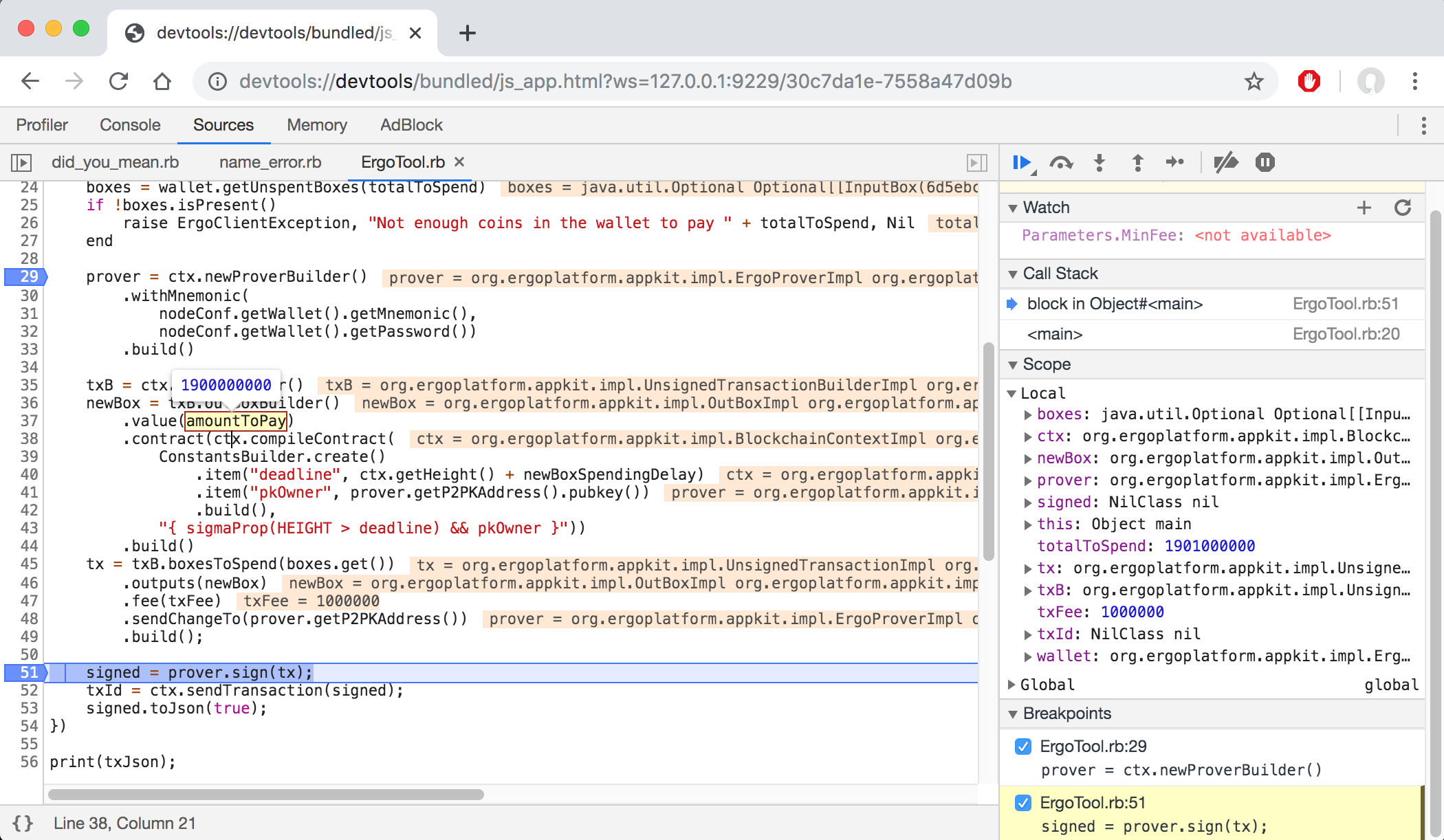
因此,我们可以使用--inspect标志运行我们的程序,这将为我们提供一个链接,以便在Chrome中打开,并将在调试器中暂停程序。
$ ruby --polyglot --jvm --inspect --vm.cp=build/libs/appkit-examples-3.1.0-all.jar \
    ruby-examples/FreezeCoin.rb 1900000000
Debugger listening on port 9229.
要开始调试,请在Chrome中打开以下URL:
    chrome-devtools://devtools/bundled/js_app.html?ws=127.0.0.1:9229/30c7da1e-7558a47d09b
...
从这里我们可以设置断点并继续执行。当它中断时,我们将看到变量的值,可以继续直到下一个断点,并做我们期望的所有调试器操作。
结论
经过这一切,我们看到使用Appkit开发Ergo应用程序是多么简单。Appkit依赖于实现Ergo共识协议所使用的完全相同的核心库。这些库包括ErgoScript编译器、加密、字节码解释器、数据序列化器和其他核心组件。使用GraalVM,我们能够在不同的应用程序上下文中重用这些经过验证的组件,而无需任何修改或自己重写它们。
无论您使用Java、JavaScript、Python还是Ruby,您都可以利用Appkit与GraalVM大大简化与Ergo区块链交互的过程,同时创建本地运行的(d)Apps。
敬请关注。在未来的帖子中,我们将向您介绍其他由Appkit驱动的有趣潜在应用。
参考文献
Share post