Storing Crypto on Ergo: Nautilus Wallet

Translation temporarily unavailable. Showing original English.
Ergo Platform

2022年3月10日

In the last month, there has been a significant increase in the infrastructure of Ergo’s ecosystem. Until recently, users were limited in their choice of wallets, but now Ergonauts have several options for storing their ERG, native tokens, and NFTs. Over the next couple of weeks, we will offer how-to guides for each of these new wallets so that all users, new and existing, can feel comfortable and confident navigating the various Ergo wallets.

For this blog, we will go over how to install and use the new Nautilus Wallet. If you are familiar with crypto wallets and how to use them, you can proceed to downloading the wallet here. If you have any questions about this wallet, you can also subscribe to the Nautilus Telegram Channel and directly interact with the developer and other community members.

Nautilus Wallet Overview

Current Features

  • Web browser extension wallet
  • dApp connectivity allows interaction with Ergo dApps
  • Privacy mode
  • Fast and efficient synchronization with the blockchain

Future features

  • Ledger integration (hardware wallet)
  • ErgoMixer integration
  • Stealth Addresses
  • NFT display
  • DexyUSD integration
  • ErgoDEX integration for in-wallet swaps
  • ErgoDNS integration
  • ErgoHandle integration

Installation

The Nautilus Wallet is currently only available for chromium based browsers. For the purposes of this demonstration, we will go through the setup in Google Chrome.

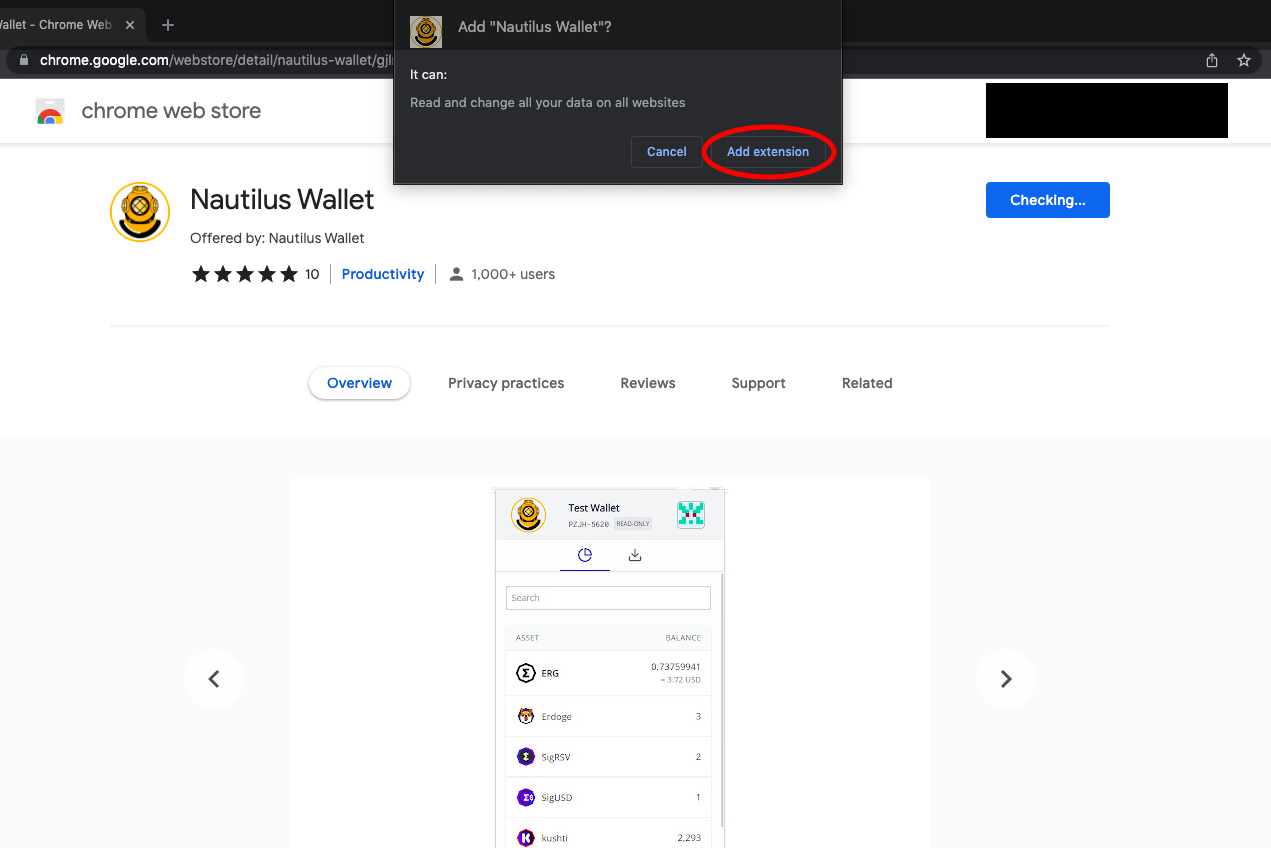
  1. Download the Nautilus Wallet from the Google Web Store: https://chrome.google.com/webstore/detail/nautilus-wallet/gjlmehlldlphhljhpnlddaodbjjcchai
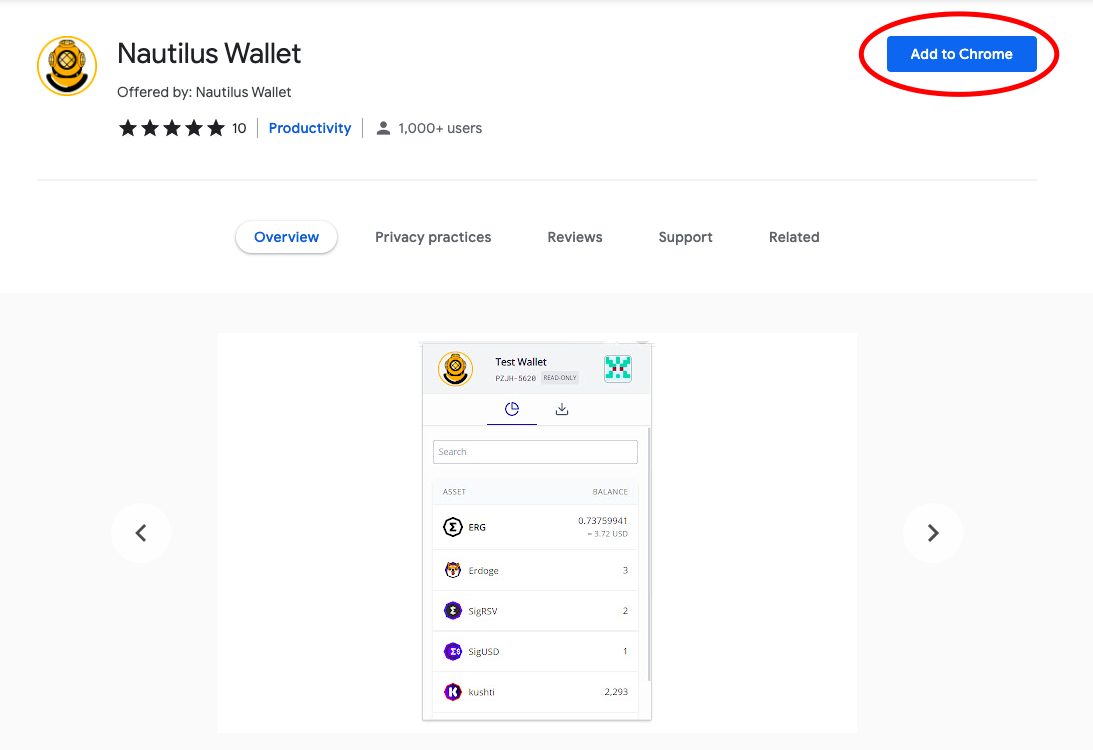
  1. Click on the Add to Chrome tab (highlighted by the red circle in the above image).
  2. A pop-up will appear and prompt you to Add extension.

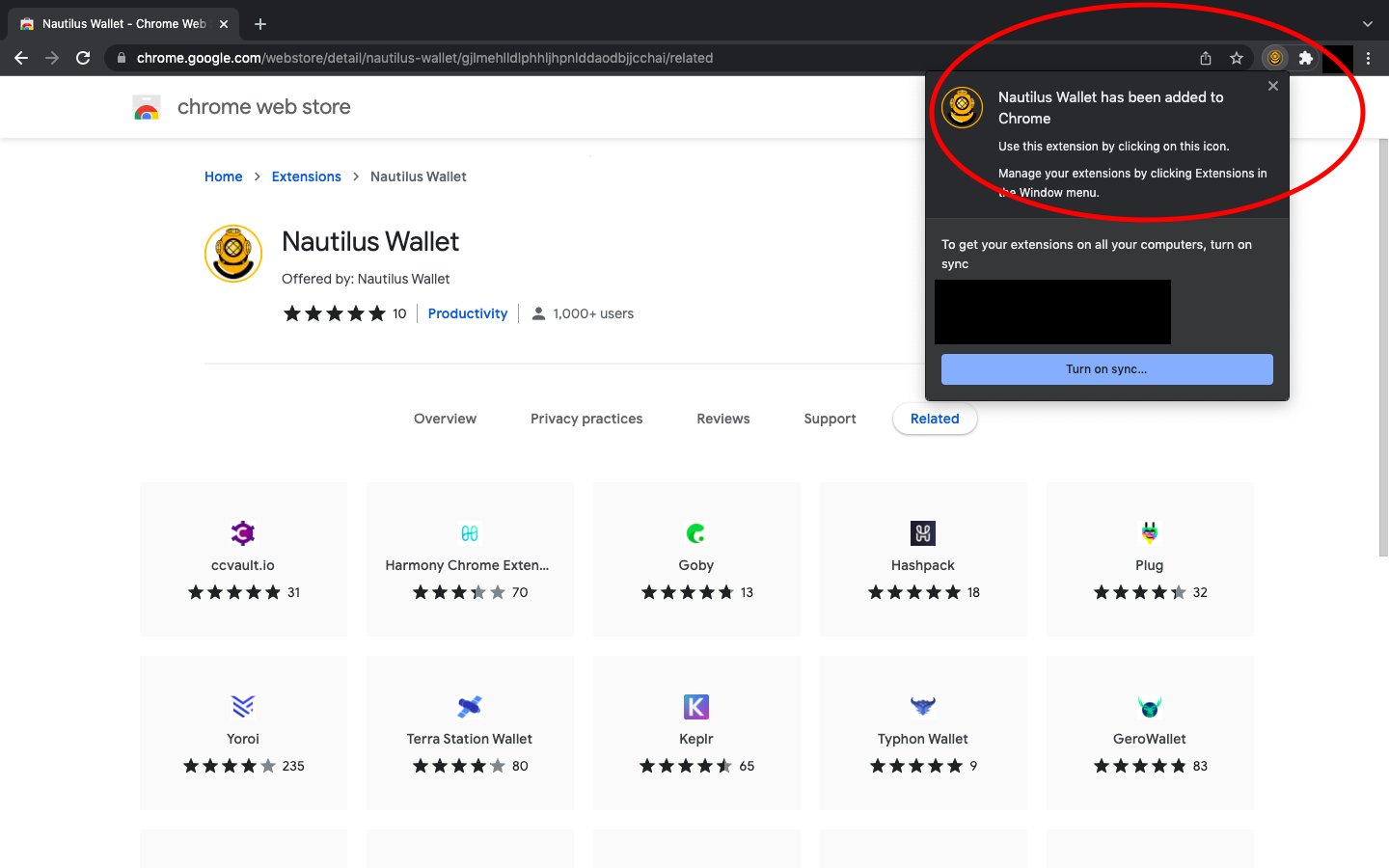
  1. After selecting Add extension, you will see the following screen:

The wallet is now installed on your web browser!

Opening Nautilus Wallet

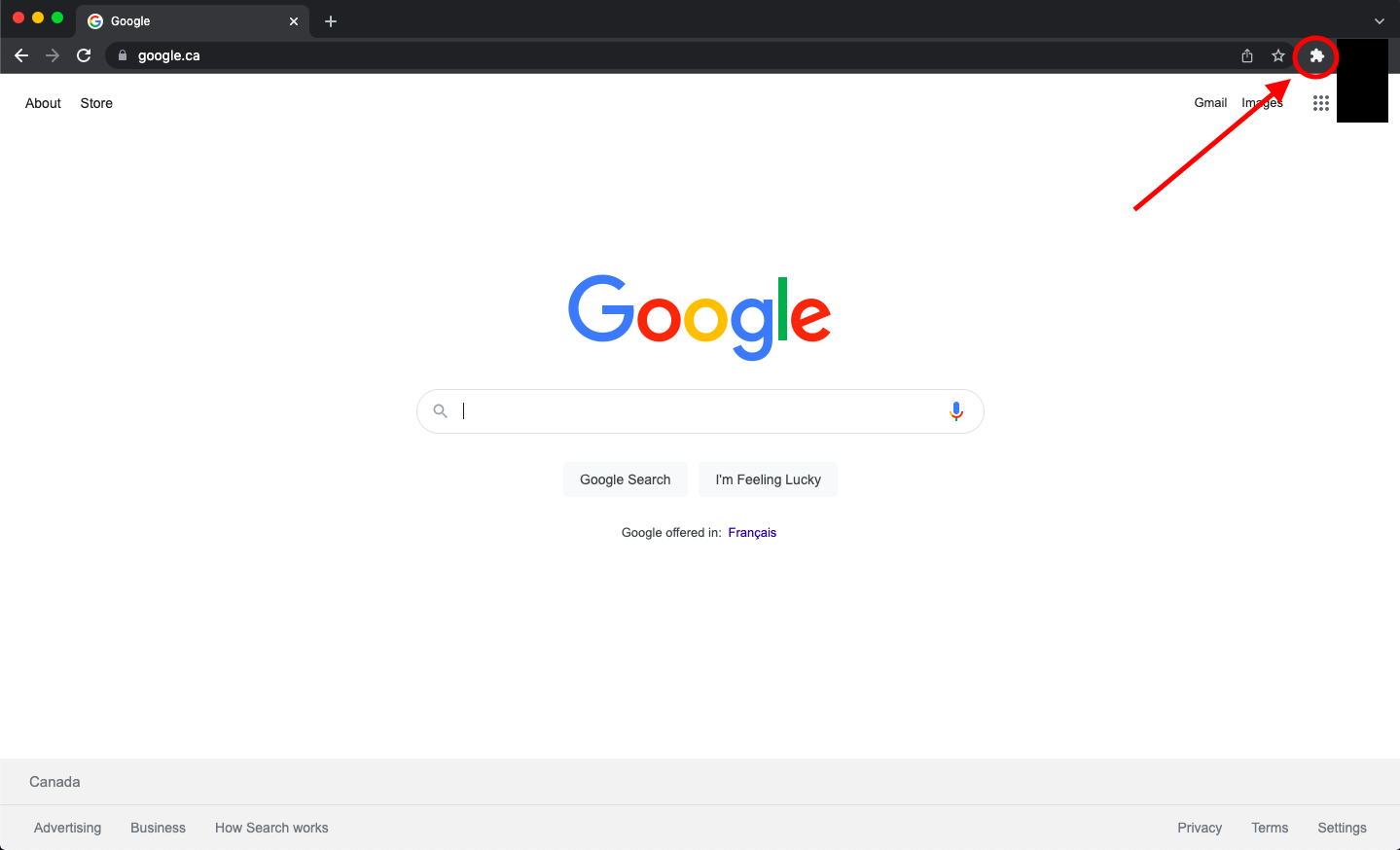
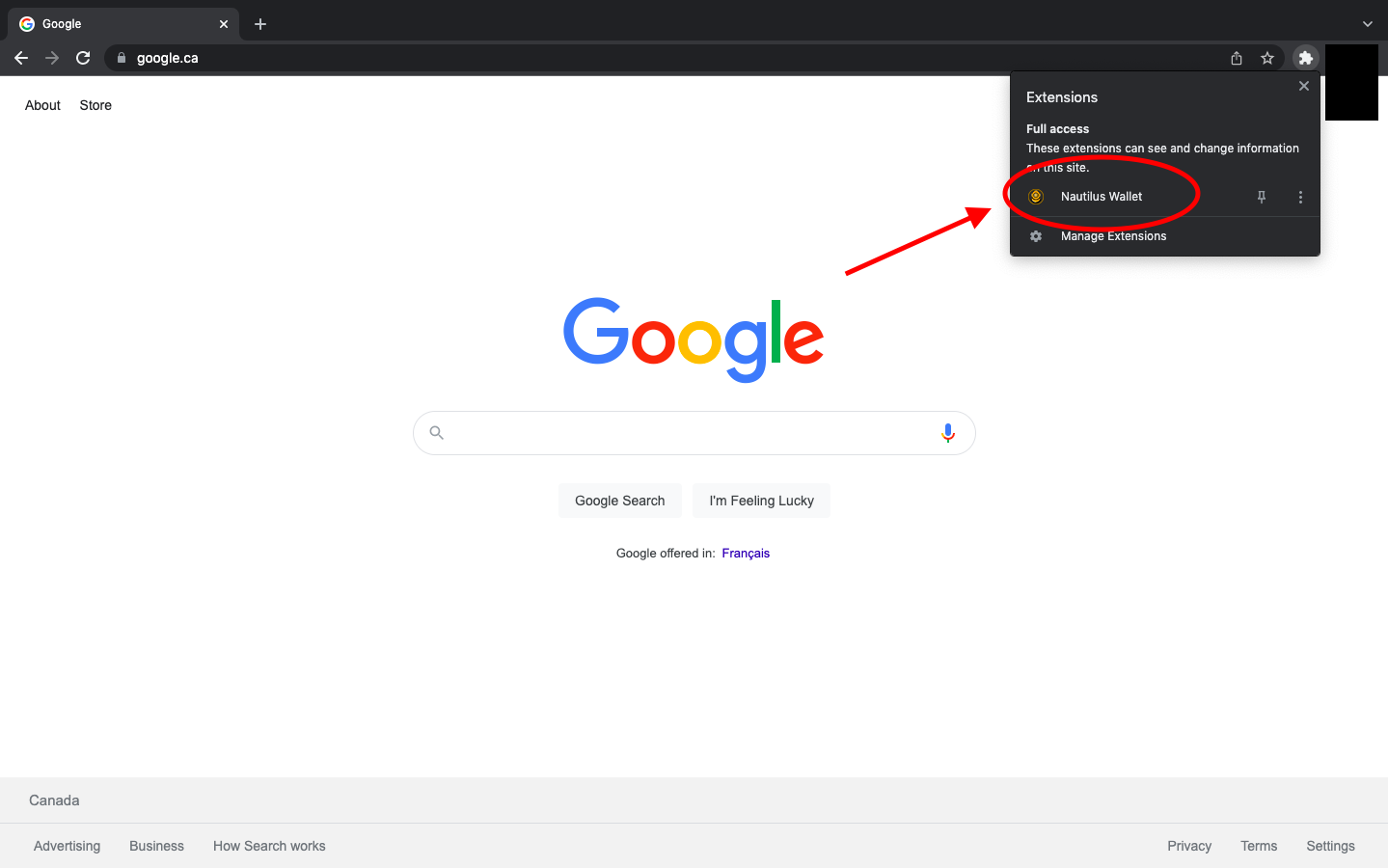
  1. Whenever you want to get to your Nautilus Wallet, you simply access the extension tab on your web browser (it looks like a puzzle piece in the top right corner of the browser). 

  1. Click on Nautilus Wallet.

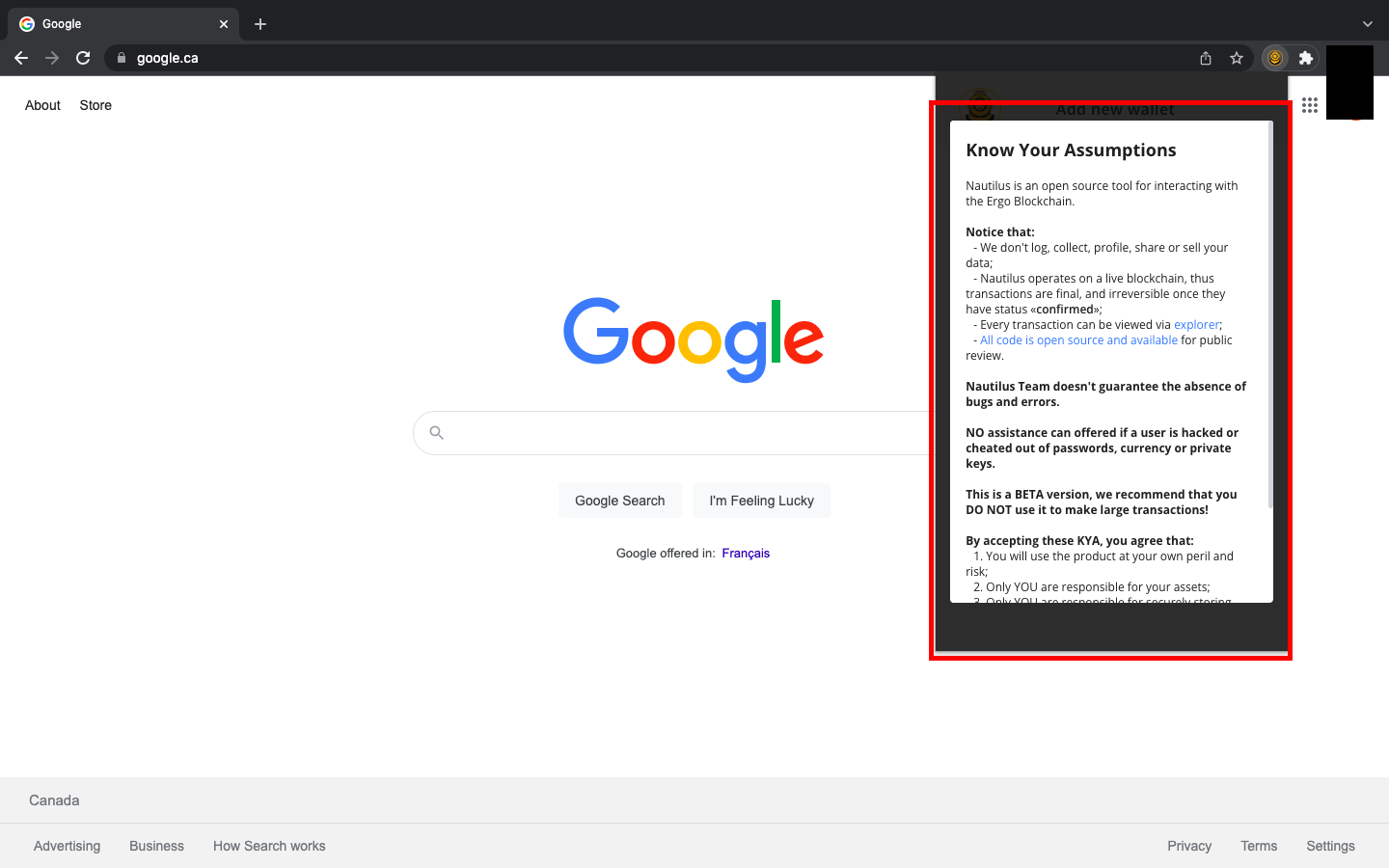
  1. When opening Nautilus Wallet for the first time, you will be prompted to read and acknowledge the KYA - Know Your Assumptions.

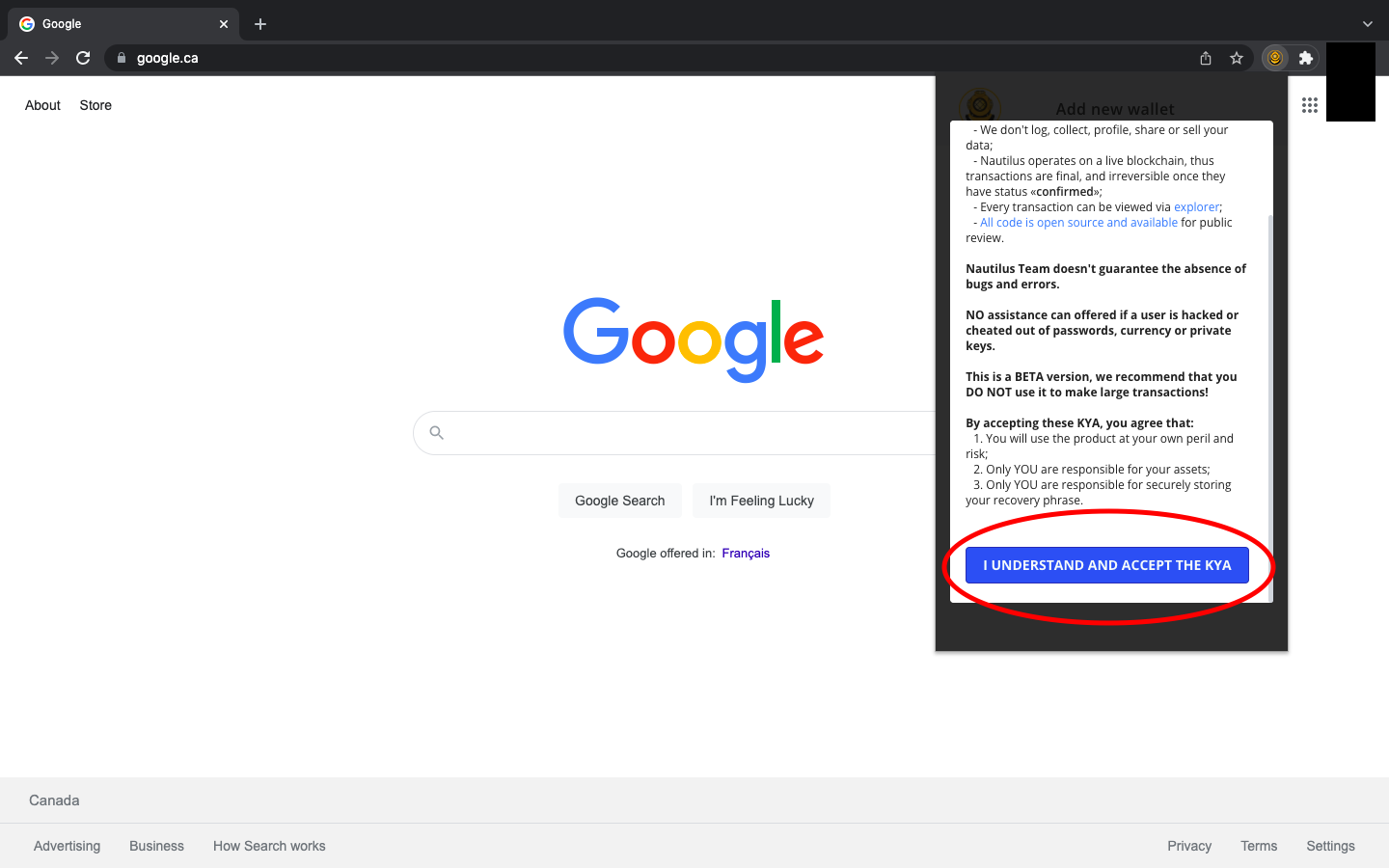
  1. Scroll to the bottom of the KYA and select I UNDERSTAND AND ACCEPT THE KYA.

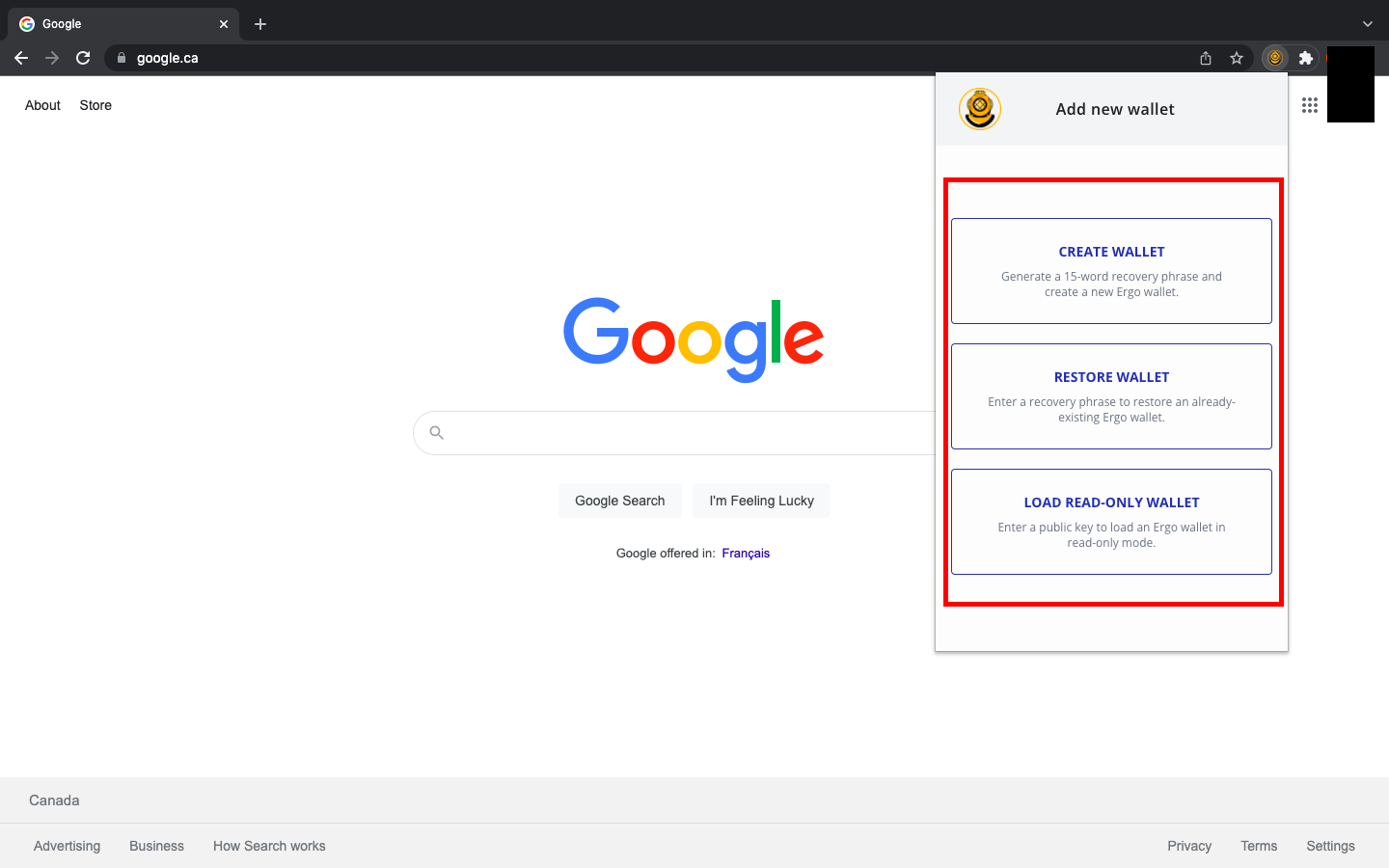
  1. Once you have accepted the KYA, you will be shown three options:
  • Create Wallet
  • Restore Wallet
  • Load Read-Only Wallet

If you have previous experience with Ergo wallets, you can restore your wallet in Nautilus with your seed phrase. If you have any pre-existing Ergo wallets, you can also decide to use Nautilus as a read-only wallet by inputting your public key. If this is your first time using an Ergo Wallet, then you will select Create Wallet.

Creating a Wallet and Understanding the Features

When creating a wallet for the first time, there are a few important security rules to practice. The most important thing is to write your password and seed phrase on paper only. Do not store this information digitally, and do not take photos of it. Your seed phrase is your line of defense against bad actors. If anyone was able to get access to your seed phrase, they could take control of your wallet and all the assets you have stored in it.

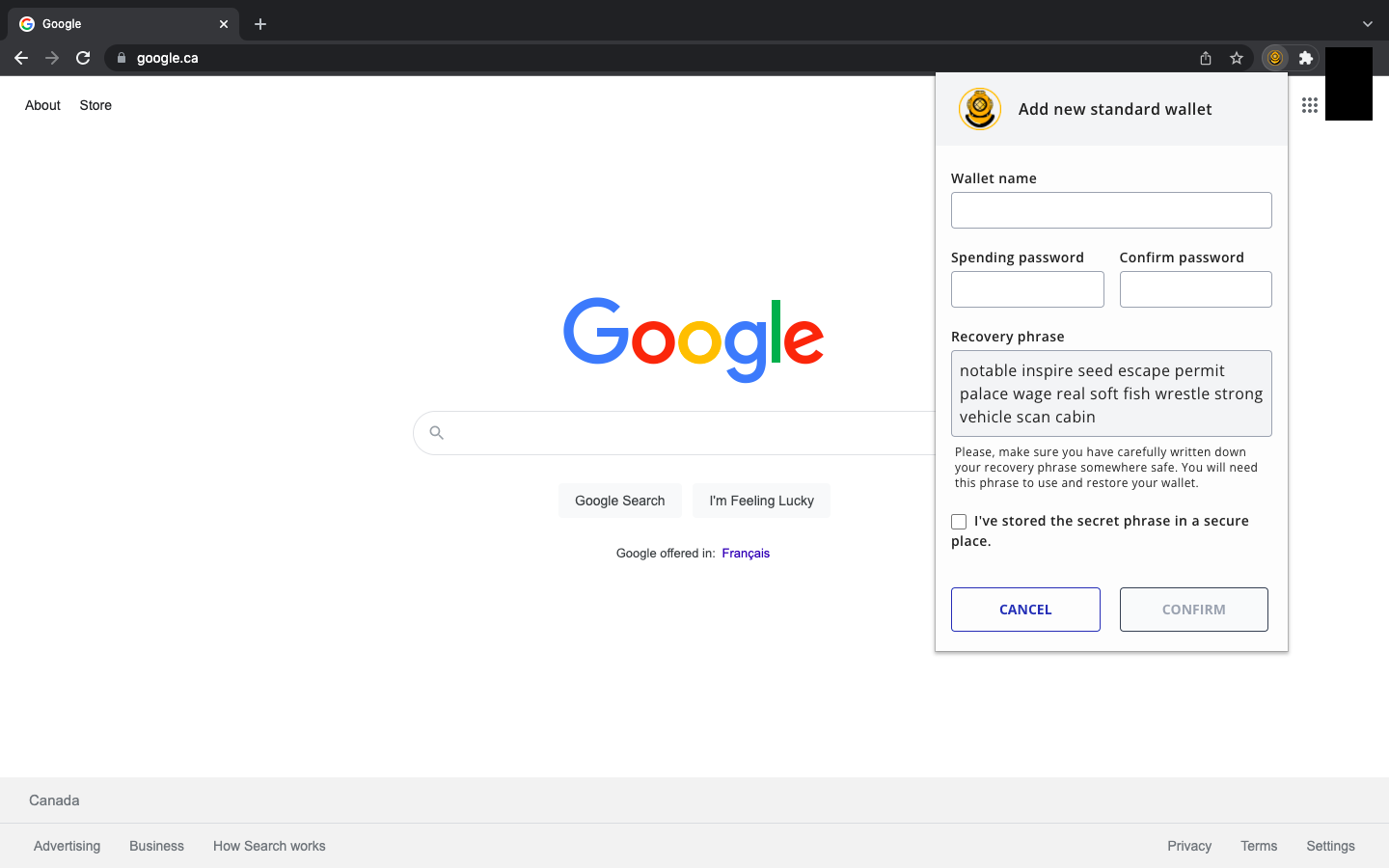
After selecting Create Wallet, you will see a screen where you can name your wallet, create your password and write down your recovery seed phrase. It will look like this:

It may seem obvious, but your seed phrase will be different from the one you see in the image above. 

REMINDER: Write your seed phrase and password on paper. You can make several copies and store them in safe places.

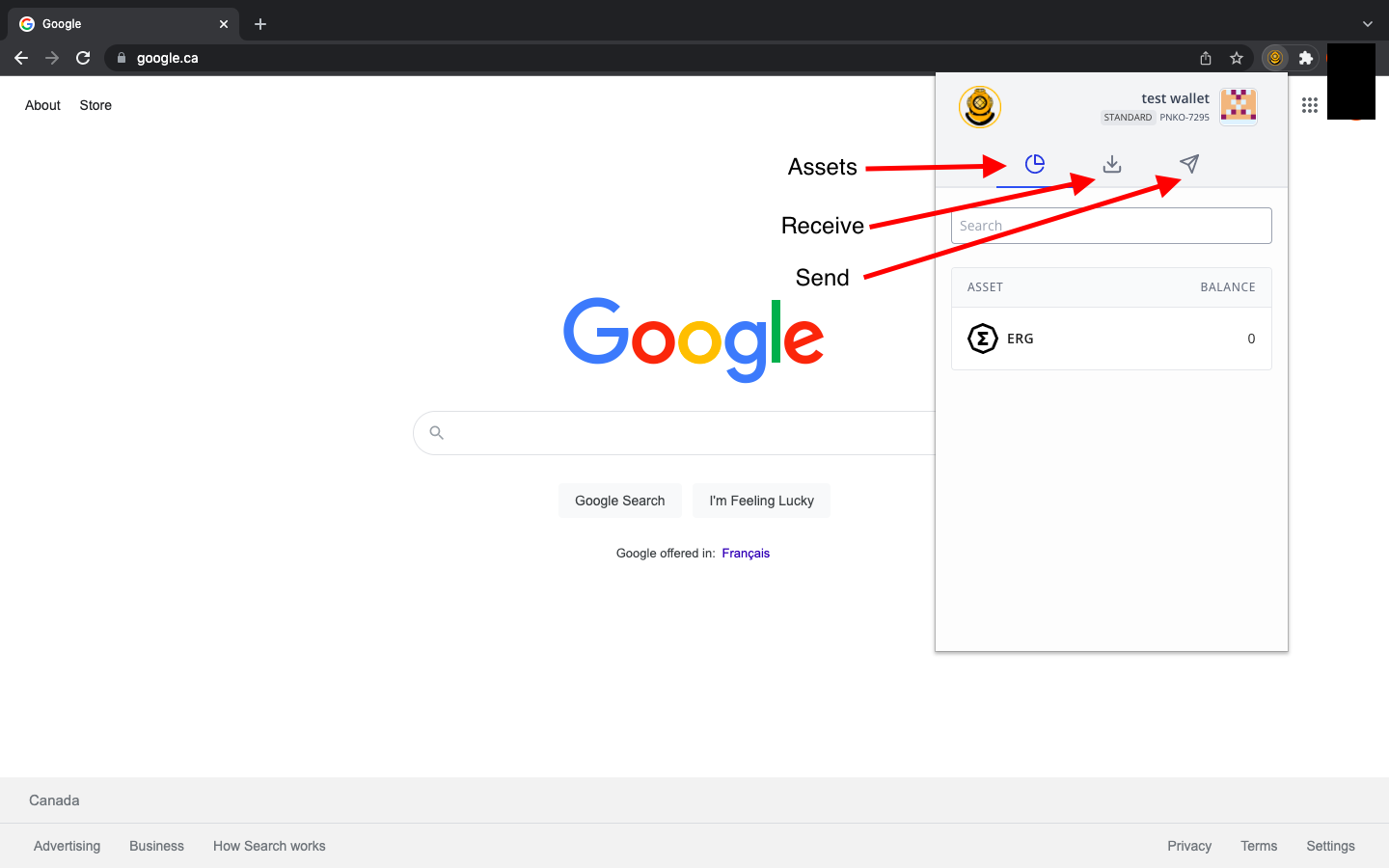
After creating your password and storing your recovery seed phrase, you will select Confirm and see the following:

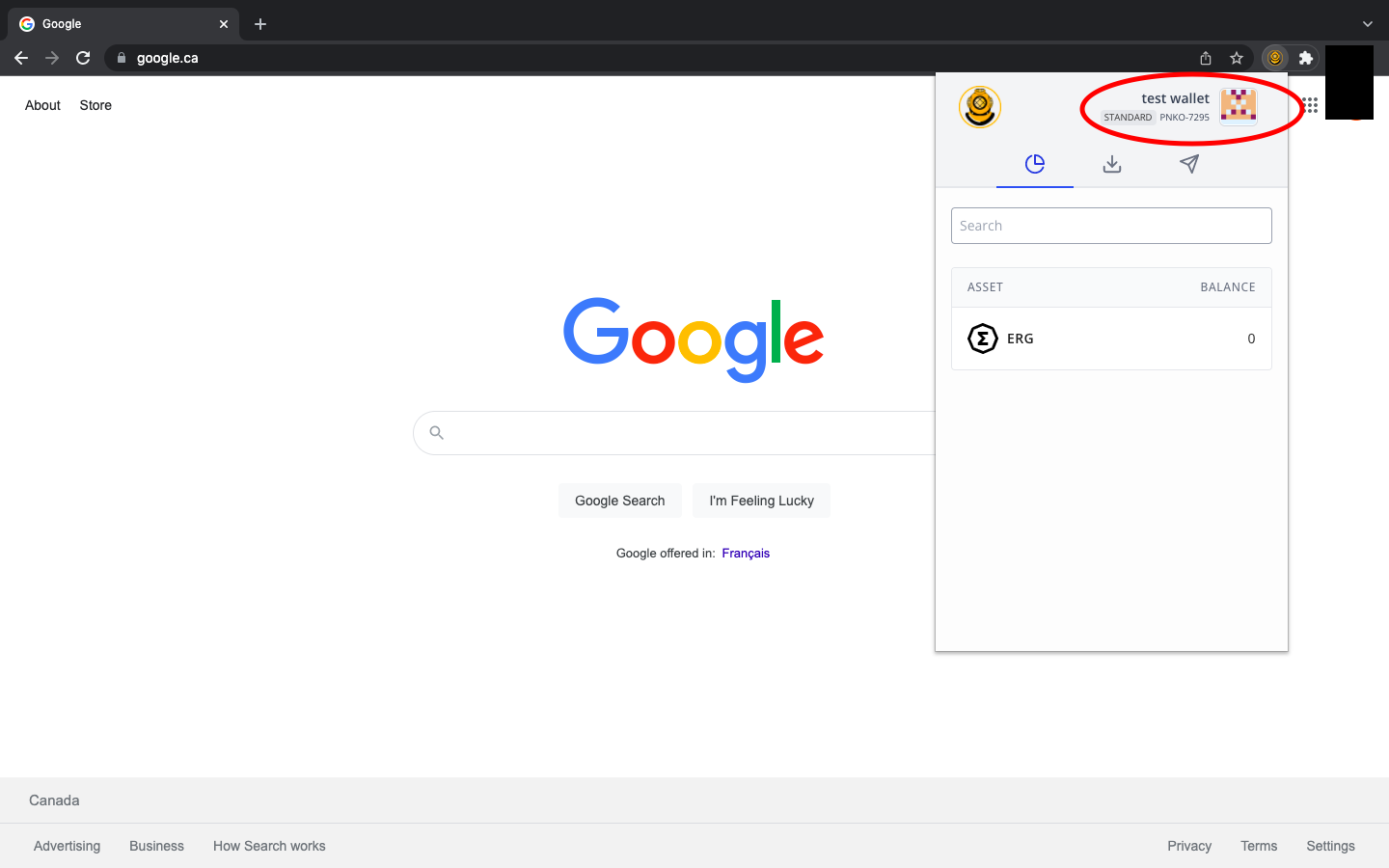
  • The Assets tab will display your ERG, NFTs and other native tokens.
  • The Receive tab will display the address you share to receive any Ergo assets.
  • The Send tab will allow you to input a receiving address so that you can send Ergo assets/payment to another wallet.

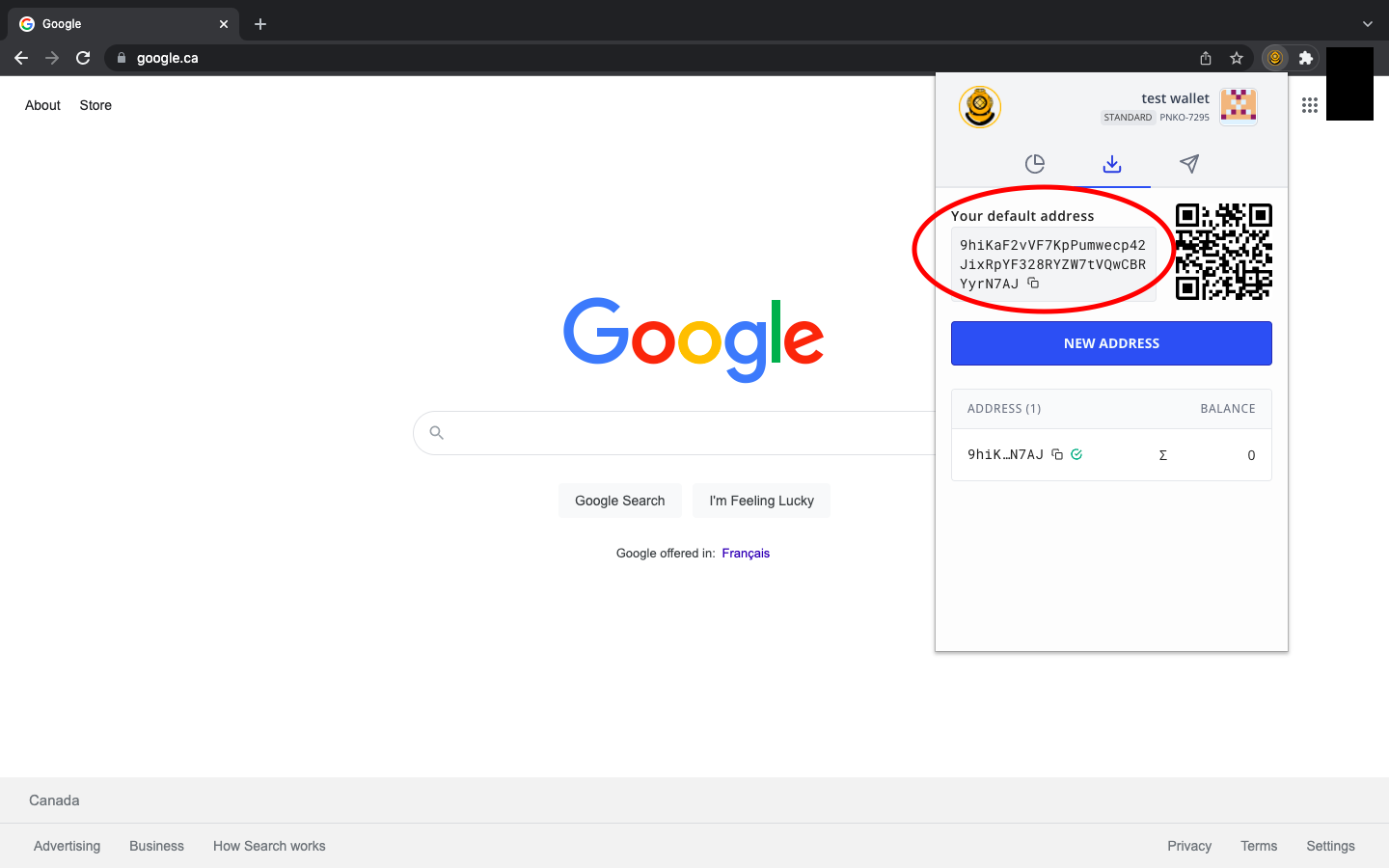
When preparing to receive assets, you will see the following screen after selecting the Receive tab:

Your receiving address will appear as a series of numbers and letters, similar to the address in the above image. If this is your first time using an Ergo wallet (or any other crypto wallet), please note that your address will be completely different from the one you see in the image.

If you are sharing your receiving address, you simply copy it to your computer clipboard and send it to the person or smart contract you are interacting with. You can easily copy the address by clicking on the two overlapping squares at the end of the address.

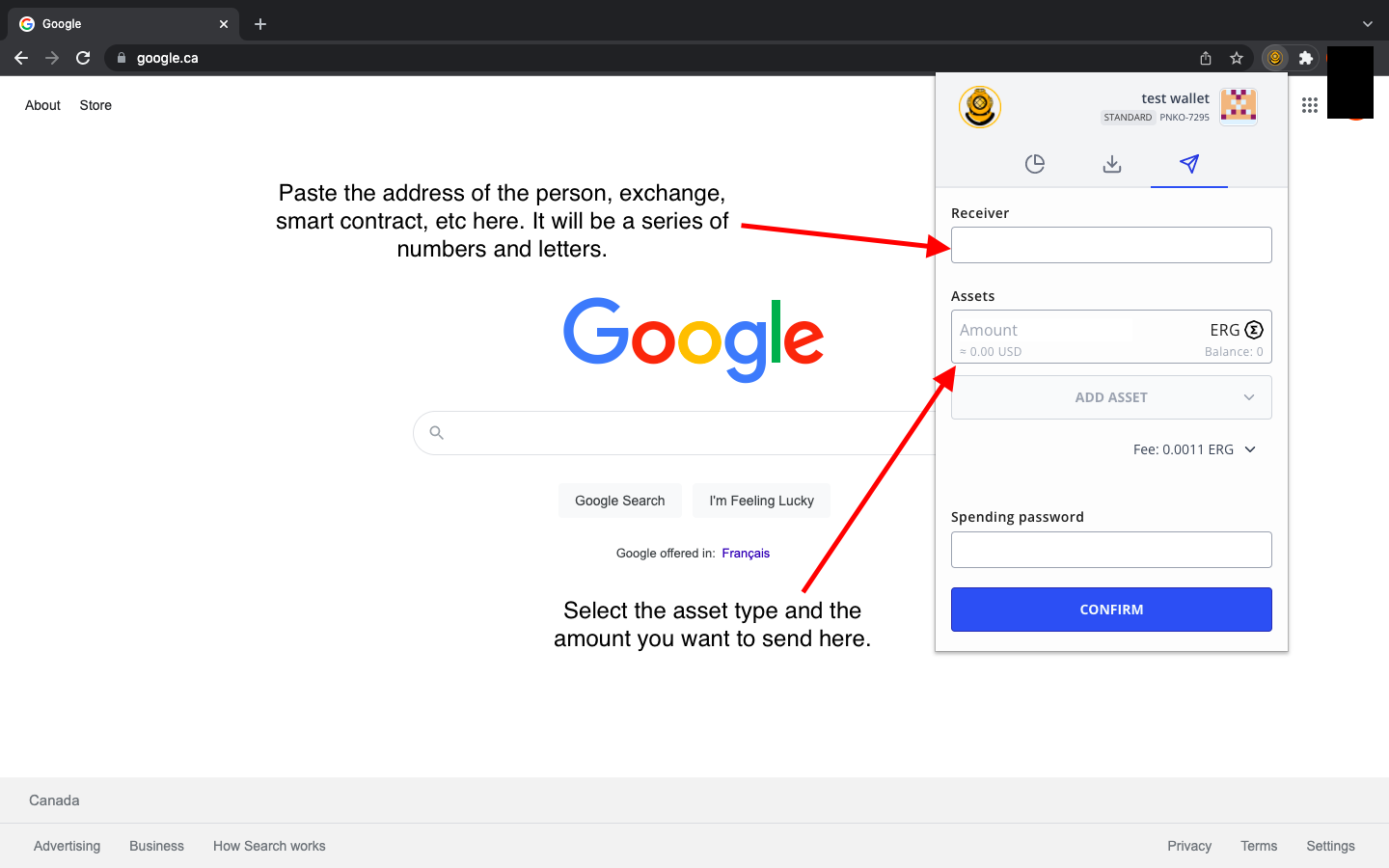
When sending assets to a person, exchange or smart contract, you will see the following:

You will input the receiving address of the person, exchange, smart contract, etc. Then, you will select the asset (it could be ERG, a native token, an NFT, etc.) and input how much you are sending. To complete the transaction, you type your wallet password and then select Confirm. That’s it! This is how you send and receive assets in the Nautilus Wallet.

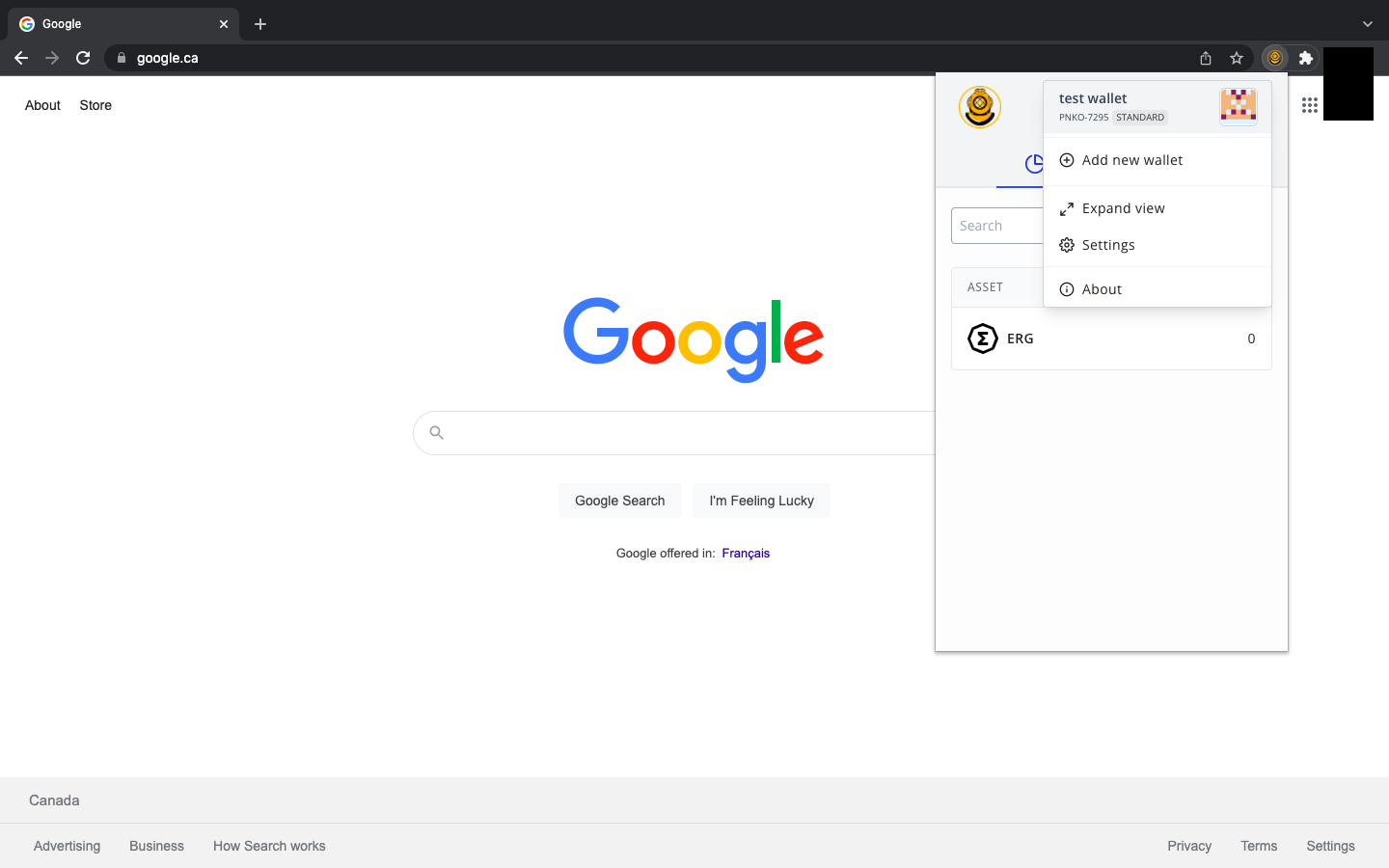
There are a few more features to be aware of as you become more familiar with the interface of the wallet. You can access more options by clicking on the wallet name in the top right corner of the application. 

After clicking on the wallet name, you will initially have four (4) options:

  • Add new wallet - simply allows you to add additional Ergo wallets
  • Expand view - allows you to view the application as a full web page
  • Settings - additional settings that we will discuss below.
  • About - provides application information and an Ergo wallet receiving address to contribute financial support to the continuing development of the wallet.

If you use this wallet to interact with any decentralized applications (dApps), you will see a fifth option (Connected dApps) that will allow you to control which dApps are connected to your wallet. 

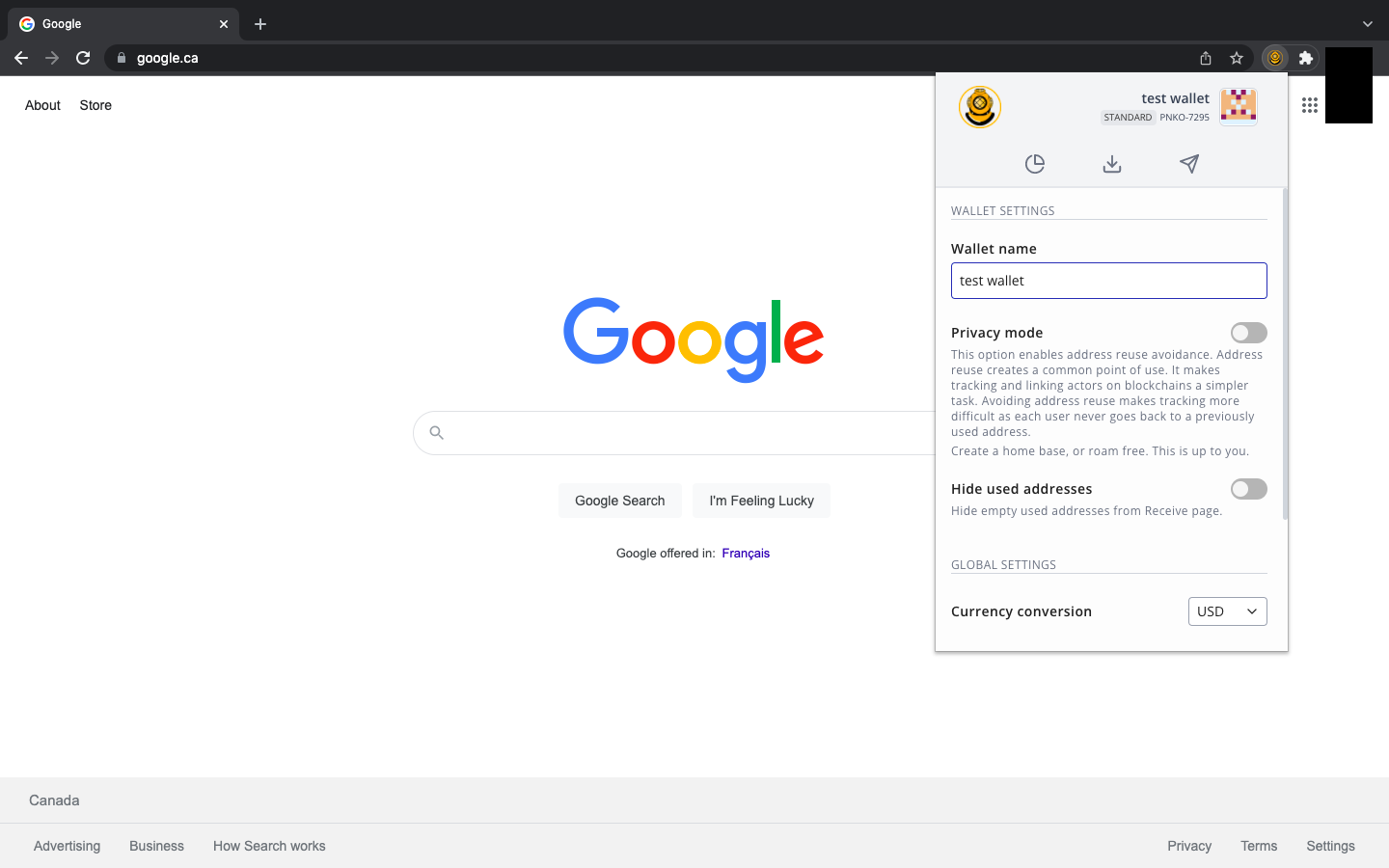
Let’s take a look at the Settings option. As was mentioned earlier in this guide, the Nautilus Wallet has some unique privacy features. 

As you can see from the above image, there is a Privacy mode option. When you turn on this feature, your wallet will create a new receiving address for every new transaction. In other words, whenever you receive any assets, the next time you go to copy your receiving address, (under the Receive tab) you will be provided with a completely new address. This feature makes it more difficult for bad actors or invasive entities to track your activity on the blockchain. Enabling this feature offers more privacy with regards to your finances.

Additional features allow you to hide previously used receiving addresses and to adjust the ERG conversion to your preferred fiat currency. 

Well done! You have set up your Nautilus Wallet and have explored all the features built into this product. With this wallet, you can easily interact with several dApps in the Ergo ecosystem, including** ErgoPad, the NFT Auction House, ErgoDEX, and SigmaUSD.**

Share post

Ergo基础设施DAO:去中心化Ergo生态系统的支柱

Ergo基础设施DAO:去中心化Ergo生态系统的支柱

Ergo的使命一直根植于去中心化,不仅在共识层面,而是在整个技术栈中。随着Ergo基础设施DAO (InfraDAO)的推出,这一愿景正在扩展到每天为生态系统提供动力的服务和基础设施。 InfraDAO现在在Paideia上正式上线,经过成功的治理投票。最初.

Ergo Platform

2025年8月13日

Mew Finance:一个为Ergo生态系统提供的有趣DeFi工具包

Mew Finance:一个为Ergo生态系统提供的有趣DeFi工具包

Mew Finance是一个基于Ergo区块链的去中心化应用套件。该项目于2024年10月启动,将DeFi、数字资产和跨链功能整合到一个统一的平台中。长期社区开发者HQΣr和Aco Šmrkas领导该项目。设计上偏向模块化、易用性和深度生态系统集成。 本文是.

Ergo Platform

2025年8月12日

Lithos:通过链上矿池实现去中心化挖矿

Lithos:通过链上矿池实现去中心化挖矿

Lithos是一个新协议,旨在通过将矿池转移到链上来彻底改革矿池的运作方式,使矿工完全控制,并消除对中心化矿池运营商的需求。与之前大多数去中心化挖矿的尝试不同,Lithos旨在高效、可扩展和安全。 什么是Lithos? Lithos是一个去中心化的矿池协议.

Ergo Platform

2025年7月24日

Sigma 6.0:更智能、更灵活的Ergo

Sigma 6.0:更智能、更灵活的Ergo

Sigma 6.

Ergo Platform

2025年7月23日

塑造Rosen的未来:关于五项关键财政提案的社区呼吁

塑造Rosen的未来:关于五项关键财政提案的社区呼吁

Rosen的联合创始人Armeanio已向Rosen财政提交了五项新提案。这些提案概述了Rosen Bridge的增长、实用性和可扩展性的战略愿景,这是Ergo互操作性基础设施的核心组成部分。 这是Ergo社区审查和讨论这一重要跨链服务未来方向的关键时刻。以.

Ergo Platform

2025年7月9日

Ergo的扩展UTXO与人工经济智能的崛起

Ergo的扩展UTXO与人工经济智能的崛起

自主经济代理的实用愿景 Ergo区块链上的自主经济代理在真实的数字经济中执行有用的工作。它们通过创建内容和提供数据分析、模式识别等服务来产生收入。它们利用收入支付运营费用,如托管费和服务器成本,并使用现代工具,如SSH和加密友好的托管服务提供商。当有额外资金.

Ergo Platform

2025年5月12日

ErgoHACK X:在Ergo区块链上的人工智能

ErgoHACK X:在Ergo区块链上的人工智能

庆祝去中心化创新的十年 加入第十届ErgoHACK,站在Ergo区块链AI革命的最前沿!释放你的创造力,与其他创新者合作,共同构建去中心化AI的未来。 关于ErgoHack ErgoHACK,旗舰社区黑客马拉松,庆祝其十周年!这一里程碑事件是Ergo生态系统.

Ergo Platform

2025年4月10日

ERG正式上线Kucoin(库币)交易所

ERG正式上线Kucoin(库币)交易所

据Kucoin官方通告,Ergo平台原生代币ERG于8月3日正式上线Kucoin(库币)交易所。目前支持的交易对是ERG/USDT。现已开放充值;2021年8月5日UTC时间上午10:00开放交易;2021年8月6日UTC时间上午10:00开放提币。 .

Ergo Foundation

2021年8月3日

Ergo两周年纪念——早期采用者应了解的核心知识

Ergo两周年纪念——早期采用者应了解的核心知识

Normal 0 false false false EN-US ZH-CN X-NONE /* Style Definitions */ table.

root7Z

2021年7月5日

关于Ergo启用官方QQ频道的公告

关于Ergo启用官方QQ频道的公告

由于Ergo官方微信号暂无法使用,Ergo官方现新增Ergo官方QQ频道:796039547。全球中文用户可通过扫描下面的二维码加入Ergo中文社区,及时了解Ergo最新官方动态. .

Eva Qing

2021年6月30日

Ergo首届黑客松大赛ERGOHACK圆满结束

Ergo首届黑客松大赛ERGOHACK圆满结束

Ergo首届黑客松大赛已经圆满结束,它正如计划那样:规模小而富有实验性,但依然收到了一些很棒的作品提交。Kushti以他的开场视频拉开了活动的序幕,然后我们总共有六个团队,其中来自anon_real(AuctionHouse、SigmaUSD UI等项目的创建.

Curia Regis Crypto

2021年6月29日

关于举办首届Ergo中国社区驱动践行活动的公告

关于举办首届Ergo中国社区驱动践行活动的公告

为了进一步提高Ergo公链平台在中国的知名度,让更多用户深入了解Ergo,同时为了践行Ergo社区驱动的理念,Ergo中国社区现特别举办“首届Ergo中国社区驱动践行活动”。活动参与者积极向新用户布道Ergo并将其引至Ergo官方指定社群,将有机会赢取ERG奖.

Eva Qing

2021年6月4日

比特币的前进之路是努力追赶Ergo ——Ergo率先实现扩展UTXO智能合约

比特币的前进之路是努力追赶Ergo ——Ergo率先实现扩展UTXO智能合约

比特币 比特币是一头野兽。是的,其底层软件需要认真升级。它真的太慢了。但是,您也必须承认它的优势,网络效应是非常强大的------比特币是加密货币之王。在全球范围内,比特币正成为一个常见、被理解和被采用的术语。大型信托、投资巨头和对冲基金经理,都被比特币的主.

Curia Regis Crypto

2021年5月23日

关于Ergo基金会任命谭声情先生担任中国区大使的公告

关于Ergo基金会任命谭声情先生担任中国区大使的公告

经Ergo基金会批准,现任命谭声情先生(英文名:Tango)担任Ergo中国区大使。 为了提升Ergo在中国的知名度与影响力,Ergo基金会现授权谭声情先生以Ergo中国区大使身份进行Ergo在中国的品牌宣传、商务洽谈、社区活动、主题推广等事宜。 此任命自.

Ergo Team

2021年5月16日

硬分叉事后说明

硬分叉事后说明

英文链接: 应@kushti的请求,我现在给大家说明一下今天在硬分叉升级期间发生的事情。有一些BUG导致矿工无法出块,现已修补好这些BUG,矿工可以出块。 version2ActivationDifficultyHex中出现往返编码失败(Round-T.

Eva Qing

2021年2月3日

硬分叉升级后Ergo挖矿须知

硬分叉升级后Ergo挖矿须知

Ergo将在区块#417,792上进行硬分叉协议升级。此次升级会引入重大更改,包括将关闭不可外包功能(Non-Outsourceability)。经过此次硬分叉之后,新的PoW(被称为Autolykos v2.

Eva Qing

2021年2月1日

如何设置和配置Ergo全节点

如何设置和配置Ergo全节点

如何设置和配置Ergo全节点 本教程说明了如何安装和运行Ergo全节点,不涵盖挖矿。  Windows用户还可以观看视频教程。 如何在Windows上设置和配置Ergo全节点 视频链接: 节点安全 这里是节点使用的一些重要方面,您的钱包及代币是否安全.

Eva Qing

2021年1月21日

既想享受乐趣,又想赚取利润? ——那就赶紧来挖ERG

既想享受乐趣,又想赚取利润? ——那就赶紧来挖ERG

Ergo GPU挖矿 本文将帮助您开始使用GPU挖矿Ergo原生代币ERG。 Ergo挖矿基于Autolykos,即一种工作量证明(PoW)算法,被设计为阻碍ASIC矿机和矿池。矿工须执行存储困难的计算(需要至少4 GB的内存,但是当前最有效的实现使用的是.

Eva Qing

2021年1月21日

适用于AMD GPU的Autolykos v2(Ergo)的OpenCL挖矿软件

适用于AMD GPU的Autolykos v2(Ergo)的OpenCL挖矿软件

适用于ergoplatform.

Eva Qing

2021年1月19日

适用于Nvidia GPU的Autolykos v2(Ergo)用Cuda挖矿软件

适用于Nvidia GPU的Autolykos v2(Ergo)用Cuda挖矿软件

用于ergoplatform.

Eva Qing

2021年1月19日

尔格基金会为主要去中心化应用(dApp)基础设施提供资助

尔格基金会为主要去中心化应用(dApp)基础设施提供资助

尔格基金会将考虑支持重大生态系统开发项目提供资助的建议。 尔格是一个面向社区的项目,该生态系统的方方面面都有许多贡献者。尔格基金会会拿出一部分资金资助此项工作,这对于构建用户所需的日常产品与服务以及更多样化的金融去中心化应用至关重要。该基金会正在积极寻求.

Guy Brandon

2020年11月17日