Mining Ergo su HiveOS
22 marzo 2022
Hai mai voluto minare Ergo ma pensavi di non avere le conoscenze tecniche necessarie? Sorprendentemente, non è un'attività così inaccessibile come potresti aver pensato. Che tu sia un miner di criptovalute alle prime armi o esperto, in realtà è abbastanza facile minare Ergo. Nel nostro precedente post del blog, abbiamo offerto i passaggi su come minare Ergo su Windows (Mining Ergo on Windows). Con questo articolo, guideremo i lettori attraverso i passaggi per minare Ergo con il popolare sistema operativo per il mining di criptovalute, HiveOS.
Non è necessario avere un mining rig per minare Ergo. Se hai un PC personale con una GPU compatibile, puoi facilmente minare Ergo e guadagnare un reddito passivo.
Avrai bisogno dei seguenti elementi per minare Ergo:
- un computer (o mining rig) con una scheda video GPU che abbia un minimo di 4GB di RAM (idealmente di più se rientra nel tuo budget)
- Un SSD esterno o una chiavetta USB (minimo 6 GB) per creare un'unità avviabile - questo scrittore ha avuto maggior successo utilizzando HiveOS su un SSD, ma molti miner utilizzano anche una chiavetta USB.
- un wallet Ergo (come Nautilus)
- un account HiveOS - ti guideremo attraverso la configurazione di questo.
Iniziamo creando il tuo account HiveOS.
- Vai al seguente sito web: https://the.hiveos.farm/login
- Vedrai una schermata di accesso con il seguente messaggio sotto: “Non hai ancora un account? Registrati”
- Seleziona “Registrati”
- Una volta richiesto, compila il modulo con la tua email, un nome utente e una password.
Una volta creato il tuo account, ti verrà chiesto di verificare la tua email e poi ti verrà offerta l'opportunità di abilitare l'autenticazione a due fattori (2FA) per una maggiore sicurezza. Quando hai finito con il 2FA, vedrai la seguente schermata:
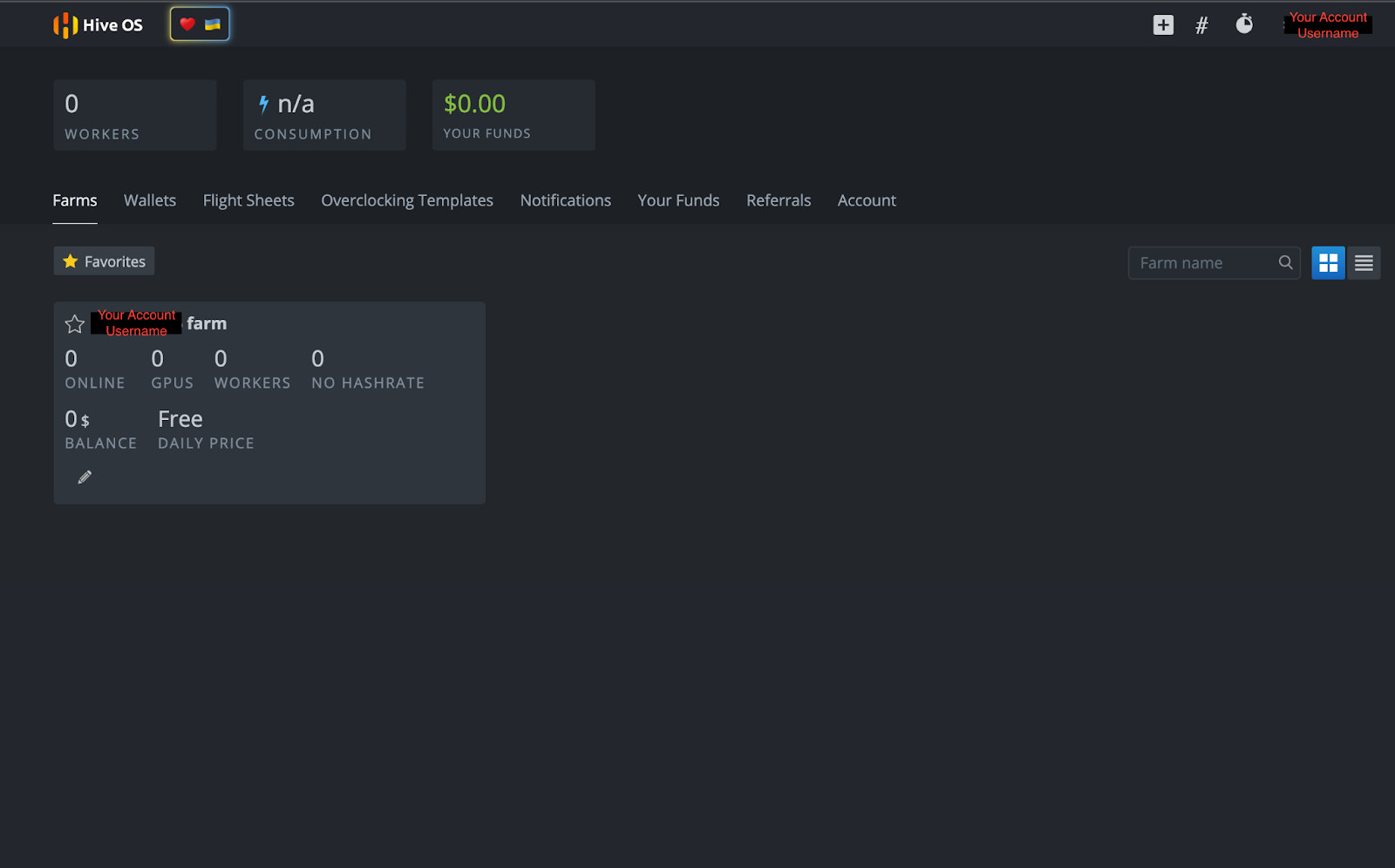
Poiché HiveOS è un sistema operativo dedicato al mining di criptovalute, l'interfaccia utente consente l'accesso a numerose funzionalità, tra cui consumo energetico, impostazioni di overclock, accesso remoto all'alimentazione e altre azioni di mining di criptovalute. Gli utenti possono anche controllare tutte queste funzionalità da remoto su uno smartphone con l'app HiveOS.
Creazione di un'unità avviabile HiveOS
Ora che hai il tuo account HiveOS, devi creare un'unità avviabile per il sistema operativo. Vai su https://hiveon.com/install/ e scarica il file ZIP sotto la categoria “GPU”.
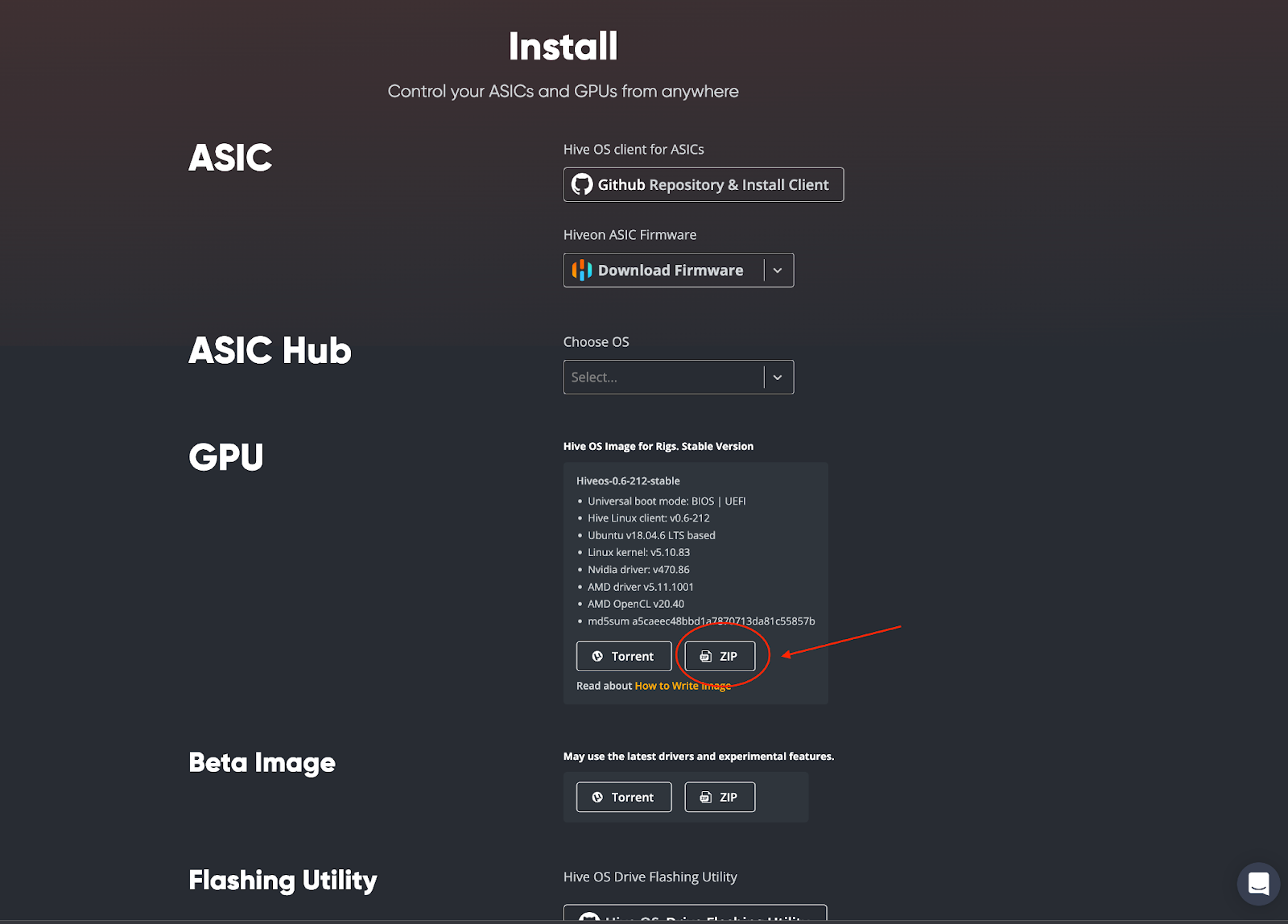
Una volta scaricato, dovrai flashare il sistema operativo sul tuo SSD esterno o chiavetta USB. Questo scrittore ha scelto di utilizzare balenaEtcher per creare l'unità avviabile e i lettori possono accedere a quel software open source qui: https://www.balena.io/etcher/. Scarica e installa il software balenaEtcher sul tuo computer. Una volta completato, apri balenaEtcher sul tuo computer. Vedrai la seguente schermata:
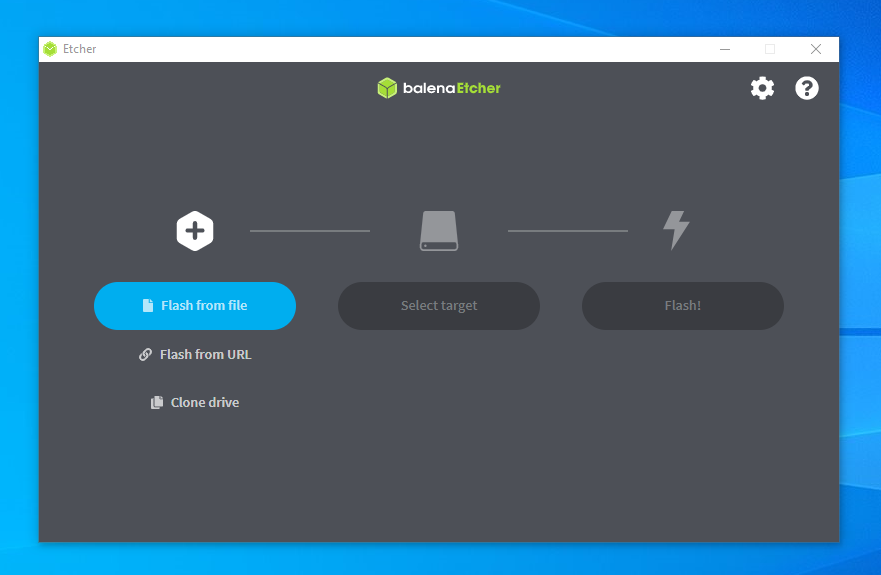
Dovrai quindi seguire questi passaggi:
- Seleziona “Flash from file” - sceglierai il file HiveOS scaricato (es. [email protected])
- Poi clicca su “Select target” - sceglierai il tuo SSD esterno o chiavetta USB
- Completa il processo selezionando “Flash!”
Ecco fatto! Ora hai HiveOS installato sulla tua unità avviabile. Ci sono solo alcune cose da configurare nel tuo account HiveOS prima di poter iniziare a minare, quindi torniamo alla tua pagina dell'account.
Configurazione del tuo miner
Nella pagina del tuo account HiveOS, clicca sul nome della tua fattoria:
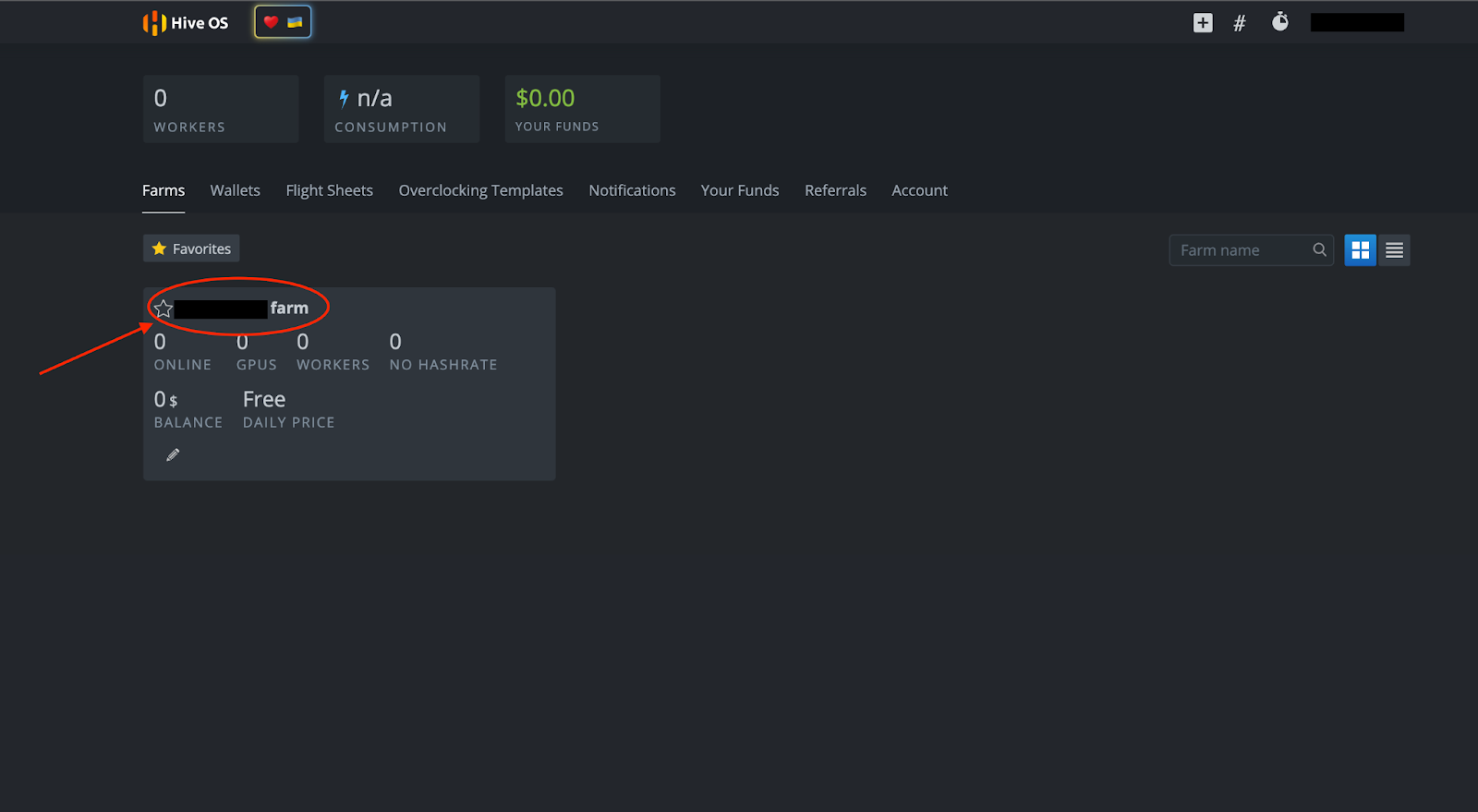
Vedrai la seguente pagina qui sotto. Da qui puoi configurare il tuo miner selezionando “+ Aggiungi Rig” o il simbolo “+” in cima alla pagina.
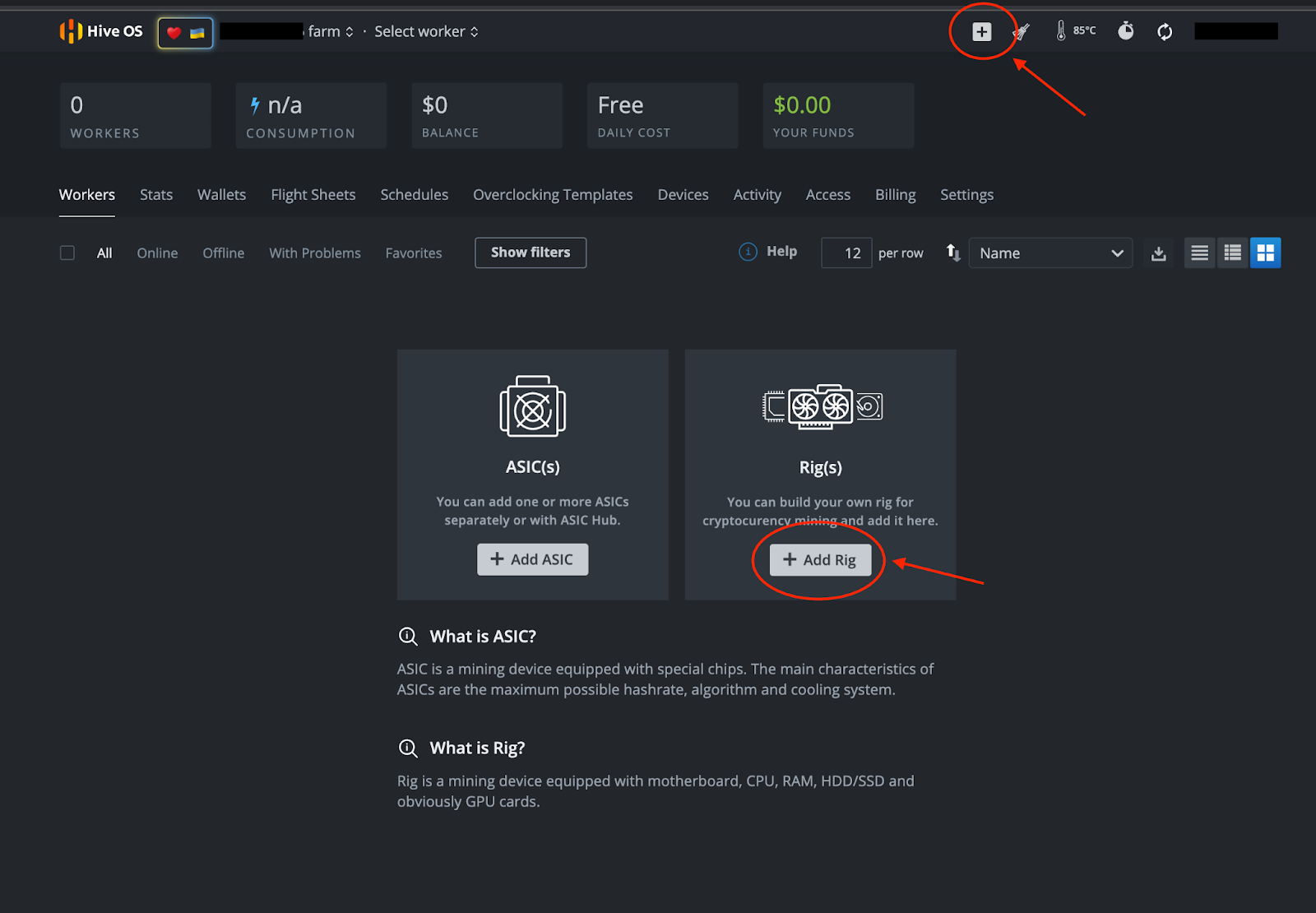
Segui questi passaggi:
- Seleziona “+ Aggiungi Rig”
- Nella schermata successiva, seleziona “Collega esistente”
- IMPORTANTE: Annota l'ID del Rig e la password (dovrai cliccare sull'icona a forma di occhio per vedere la password) che vedi nella pagina successiva:
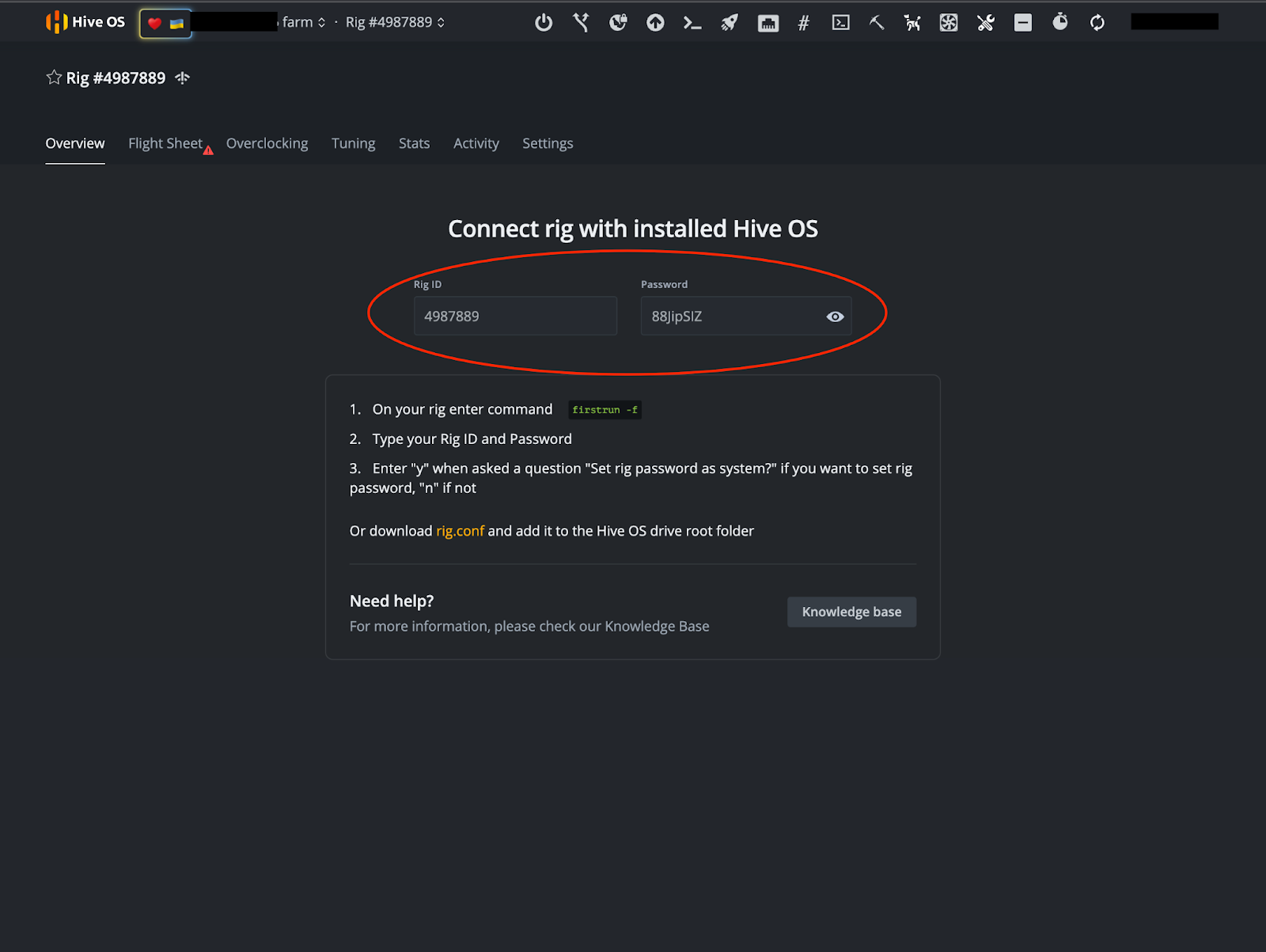
Nota: Questo non è un account dimostrativo e non è un miner operativo.
Wallet e Flight Sheet
Una volta che hai annotato il tuo ID del Rig e la Password, è tempo di configurare il tuo wallet e il Flight Sheet. Nell'immagine sopra, vedrai una scheda “Flight Sheet” vicino alla parte superiore destra dello schermo. Dopo aver selezionato quella scheda, ti verrà chiesto di “Vai alla lista.”
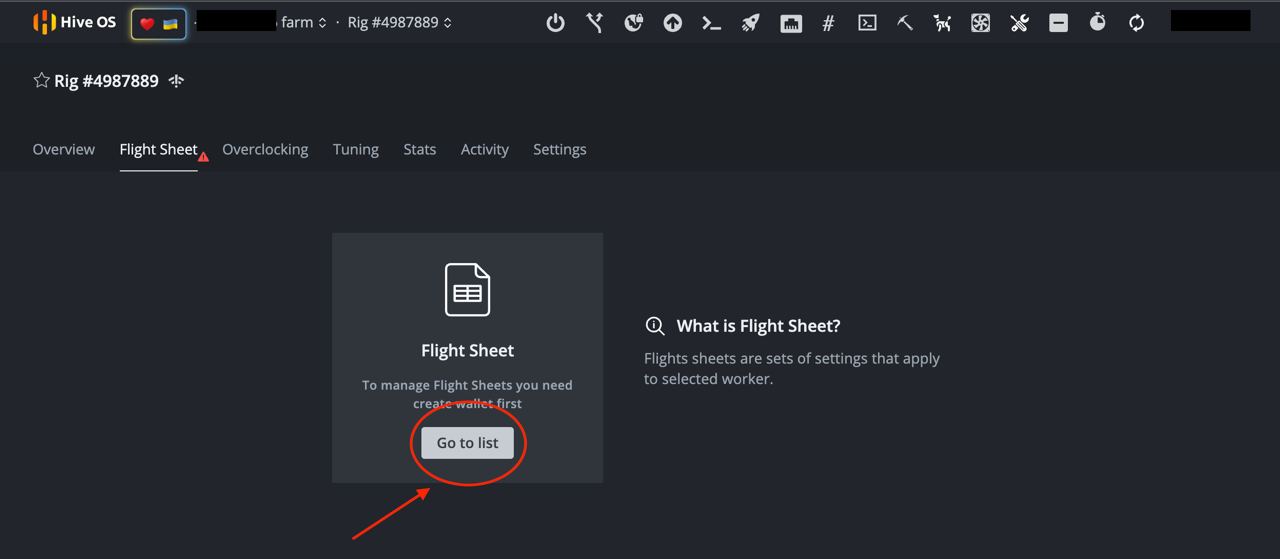
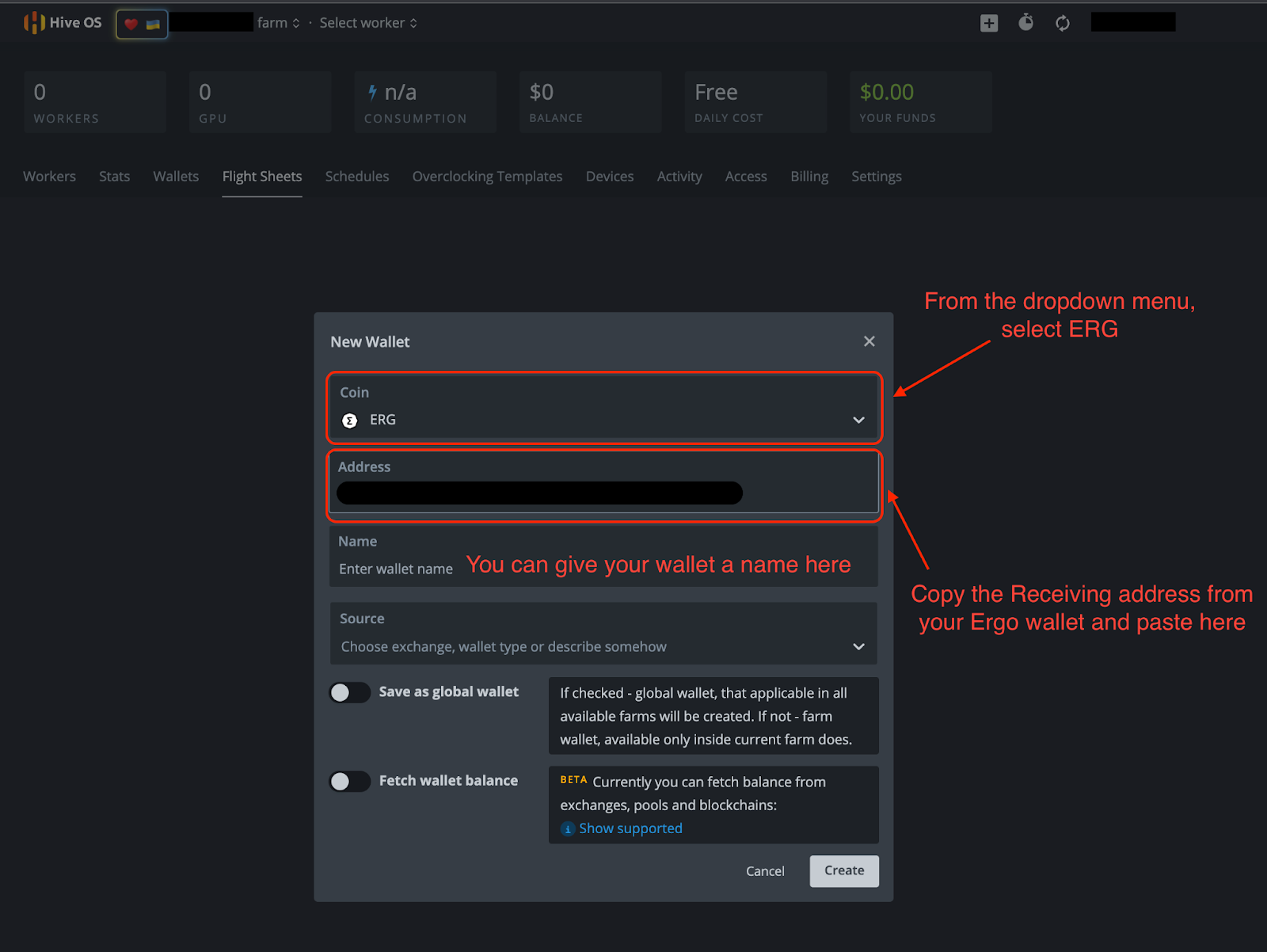
Seleziona “Vai alla lista” e clicca su “+ Aggiungi Wallet.” Da lì, dovrai compilare le informazioni necessarie nell'immagine qui sotto.
- Coin: ERG
- Indirizzo: Il tuo indirizzo di ricezione dal tuo wallet Ergo.
- Gli altri dettagli sono facoltativi.
- Clicca su “Crea”
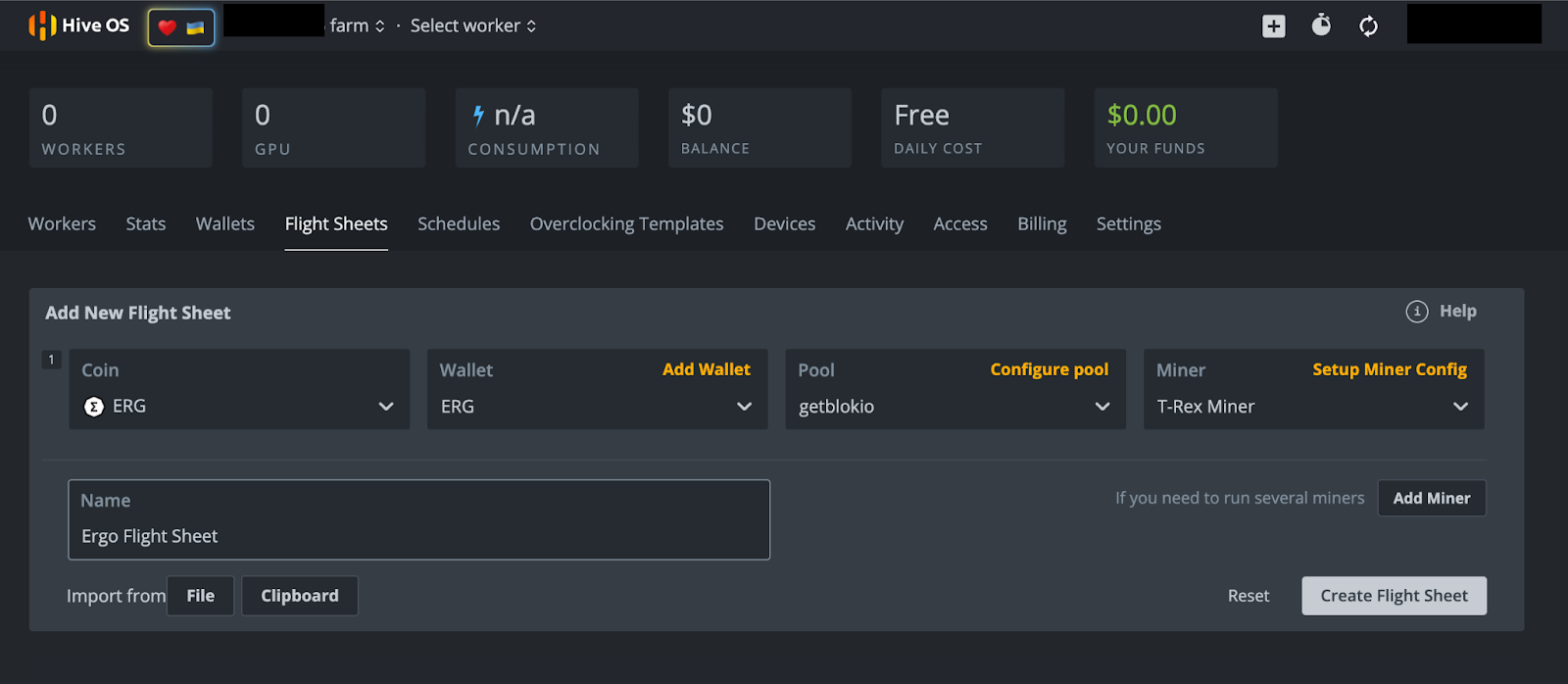
Dopo aver cliccato su “Crea,” verrai riportato alla pagina del Flight Sheet. Da lì, seleziona l'opzione “+ Aggiungi Flight Sheet” e compila i seguenti dati nella schermata successiva (esempio nell'immagine qui sotto).
- Coin: ERG
- Wallet: Dal menu a discesa seleziona il tuo wallet Ergo.
- Pool: Hai numerose opzioni qui. Questo scrittore ha selezionato il mining pool Getblok, ma avrai diversi altri pool tra cui scegliere nel menu a discesa. Quando scegli un pool, è spesso consigliato scegliere un pool più piccolo con meno hashrate rispetto al pool più grande. Questo aiuta a distribuire l'hashrate e limitare le possibilità di un attacco del 51%. Questo può accadere se un pool di mining riceve il 51% (o più) dell'hashrate della rete, creando uno scenario che potrebbe compromettere la sicurezza della blockchain.
- Miner: Dal menu a discesa avrai diverse opzioni. Scegli “T-Rex Miner” per GPU Nvidia o “TeamRedMiner” per GPU AMD.
- Nome: Dai un nome al tuo Flight Sheet - può essere qualsiasi cosa tu desideri.
- Seleziona “Crea Flight Sheet”
Mining
Iniziamo a minare!
Se stai minando da un rig, assicurati che la tua nuova unità avviabile HiveOS sia collegata al tuo rig. Se stai usando il tuo computer personale, assicurati di avere la tua unità avviabile HiveOS collegata prima di accendere il computer.
Accendi il computer e tieni premuto il pulsante per entrare nel BIOS. Questo pulsante è tipicamente uno dei seguenti: F1, F2, F10, DELETE o ESC. Una volta nel BIOS, seleziona l'unità avviabile HiveOS sotto l'opzione Boot. Se hai problemi ad accedere a queste impostazioni, il seguente articolo offre una panoramica su come riavviare il computer da un'altra unità.
Poiché questa sarà la prima volta che hai avviato il tuo miner in HiveOS, dovrai inserire l'ID del Rig e la Password che hai annotato in precedenza. Aspetta che HiveOS finisca di caricarsi e ti verrà chiesto di fornire queste informazioni. Se non ti viene richiesto dopo aver atteso alcuni minuti, digita “firstrun -f” e premi INVIO. Il sistema operativo chiederà se desideri cambiare la password del miner dopo aver digitato la password inizialmente fornita. Puoi selezionare “Y” (Sì, cambia password) o “N” (non cambiare password).
C'è solo un ultimo passaggio e richiede che tu acceda al tuo account HiveOS. Se stavi accedendo a questo account dal computer da cui stai cercando di minare, ti consigliamo di utilizzare l'app mobile HiveOS per accedere al tuo account HiveOS.
- Seleziona il nome della tua fattoria.
- Seleziona il Rig #. Ai fini di questa dimostrazione, il numero del rig che abbiamo mostrato nelle immagini sopra è 4987889. Si prega di notare che il numero del tuo rig sarà unico per il tuo account HiveOS.
- Seleziona la scheda “Flight Sheet”.
- Nella schermata successiva, vedrai un simbolo a forma di razzo accanto al Flight Sheet Ergo che hai creato. Clicca sul razzo per assegnare il flight sheet al tuo miner.
- Il tuo miner ora sta minando Ergo.
Conclusione e Overclocking
Come accennato in precedenza in questo articolo, puoi godere di un accesso remoto completo al tuo miner dall'app mobile. Se hai dedicato del tempo a configurare questo miner, dovresti sfruttare al massimo le capacità della tua GPU.
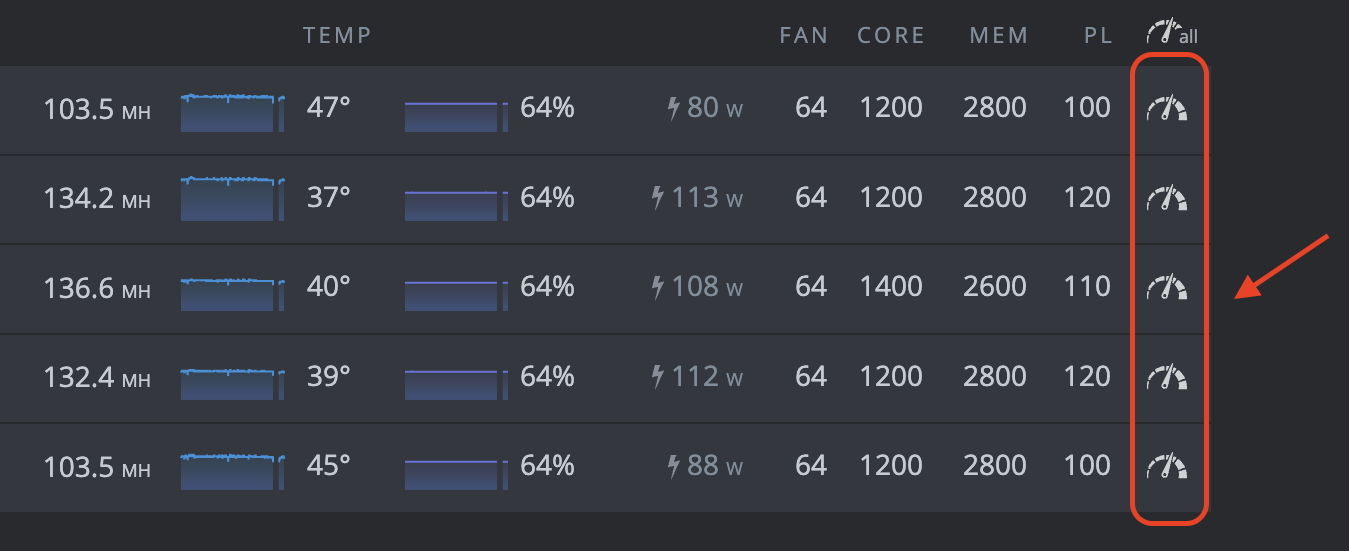
Puoi cliccare su uno di questi simboli dell'orologio per accedere alle impostazioni di overclock per ciascuna delle tue GPU. Per guide dettagliate sull'overclocking, ti preghiamo di fare riferimento al Canale Telegram di Mining Ergo. Quel canale contiene una guida all'overclocking nei messaggi fissati.
Ecco fatto! Questo potrebbe sembrare un sacco di passaggi, ma una volta che hai tutto configurato, il software HiveOS fornisce un accesso conveniente al tuo miner. Buon mining! Dovresti iniziare a vedere ERG depositati nel tuo wallet Ergo entro 1-2 giorni (a seconda del tuo hashrate).
Share post
13 agosto 2025


9 luglio 2025

12 maggio 2025











7 agosto 2022