Minerando Ergo no HiveOS
22 de março de 2022
Você já quis minerar Ergo, mas achou que talvez não tivesse o conhecimento técnico? Surpreendentemente, não é uma atividade tão inacessível quanto você poderia pensar. Seja você um minerador de criptomoedas novato ou experiente, na verdade é bastante fácil minerar Ergo. Em nosso post anterior, oferecemos etapas sobre como minerar Ergo no Windows (Minerando Ergo no Windows). Com este artigo, guiaremos os leitores pelas etapas de mineração de Ergo com o popular sistema operacional de mineração de criptomoedas, HiveOS.
Você não precisa necessariamente ter um rig de mineração para minerar Ergo. Se você tem um PC pessoal com uma GPU compatível, pode facilmente minerar Ergo e ganhar uma renda passiva.
Você precisará do seguinte para minerar Ergo:
- um computador (ou rig de mineração) com uma placa de vídeo GPU que tenha no mínimo 4GB de RAM (idealmente mais, se estiver dentro do seu orçamento)
- Um SSD externo ou pen drive USB (mínimo de 6 GB) para criar um disco inicializável - este autor teve mais sucesso usando HiveOS em um SSD, mas muitos mineradores também usam um pen drive USB.
- uma carteira Ergo (como Nautilus)
- uma conta HiveOS - nós o guiaremos na configuração.
Vamos começar criando sua conta HiveOS.
- Vá para o seguinte site: https://the.hiveos.farm/login
- Você verá uma tela de login com a seguinte mensagem abaixo: “Ainda não tem uma conta? Registre-se”
- Selecione “Registrar”
- Quando solicitado, preencha o formulário com seu e-mail, um nome de login e uma senha.
Depois de criar sua conta, você será solicitado a verificar seu e-mail e, em seguida, terá a oportunidade de habilitar a Autenticação de Dois Fatores (2FA) para maior segurança. Quando terminar com a 2FA, você verá a seguinte tela:
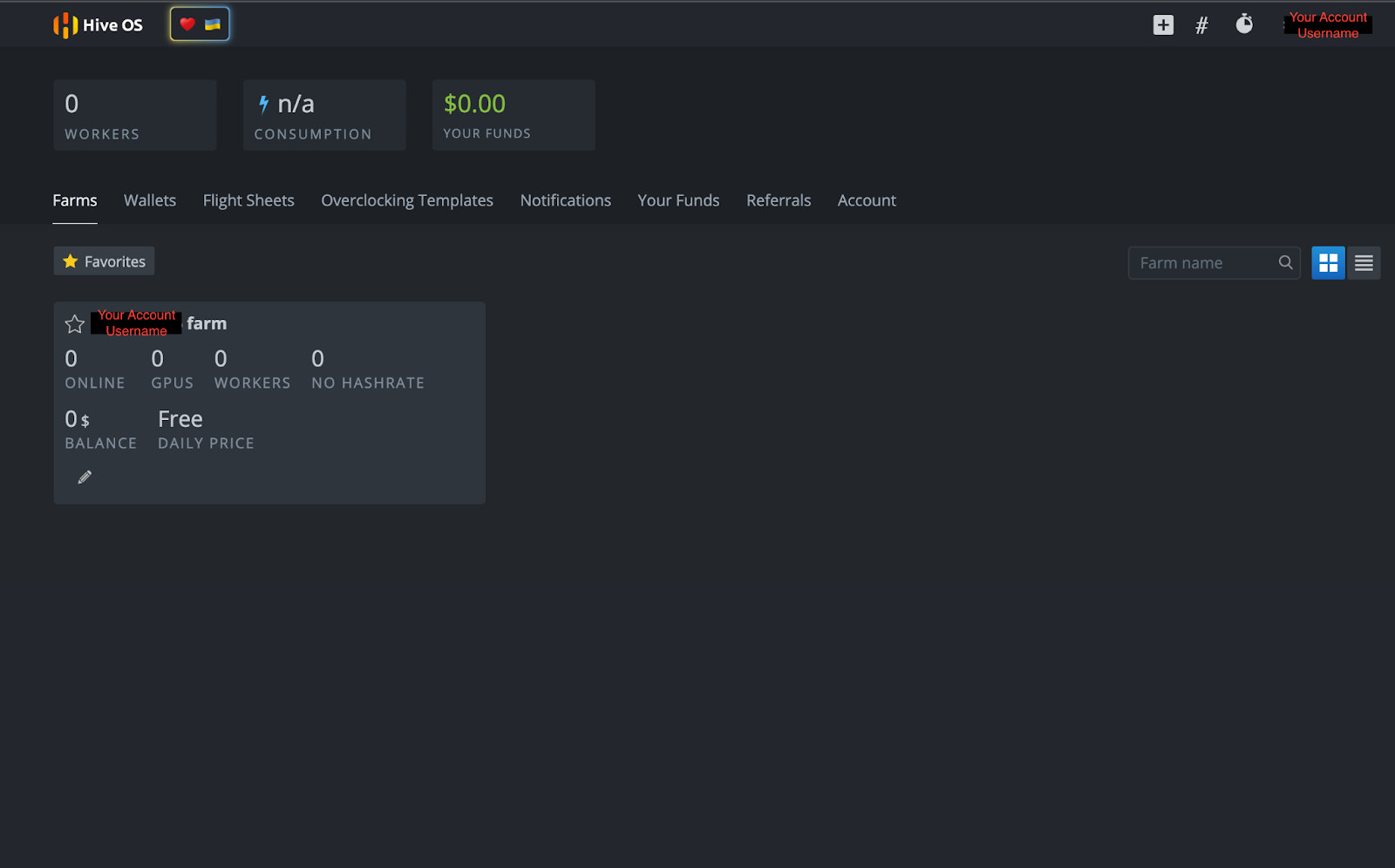
Como o HiveOS é um sistema operacional dedicado à mineração de criptomoedas, a interface do usuário permite acesso a numerosos recursos, incluindo consumo de energia, configurações de overclock, acesso remoto à energia e outras ações de mineração de criptomoedas. Os usuários também podem controlar todos esses recursos remotamente em um smartphone com o aplicativo HiveOS.
Criando um Disco Inicializável HiveOS
Agora que você tem sua conta HiveOS, precisa criar um disco inicializável para o sistema operacional. Vá para https://hiveon.com/install/ e baixe o arquivo ZIP na categoria “GPU”.
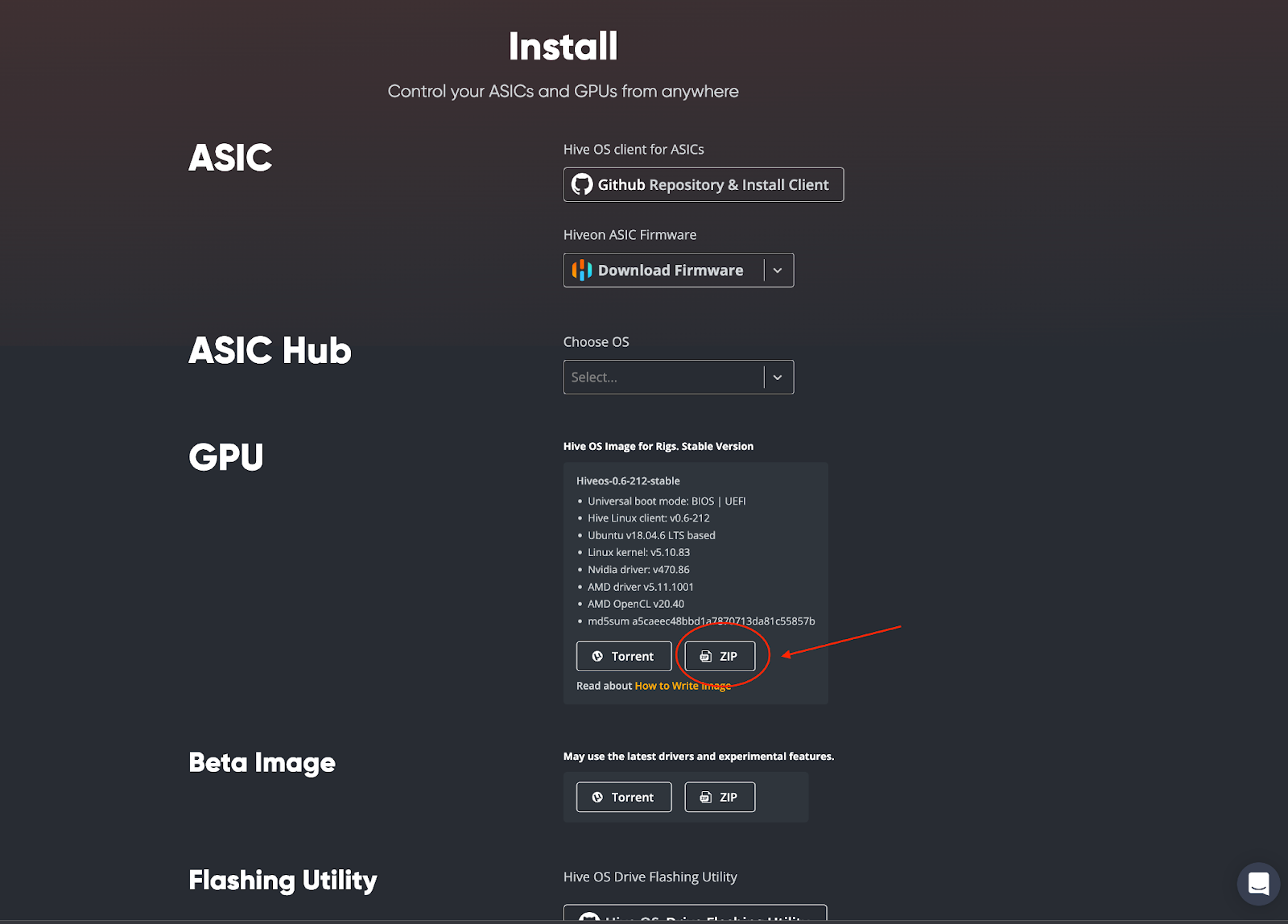
Uma vez baixado, você precisará gravar o sistema operacional em seu SSD externo ou pen drive USB. Este autor escolheu usar o balenaEtcher para criar o disco inicializável e os leitores podem acessar esse software de código aberto aqui: https://www.balena.io/etcher/. Baixe e instale o software balenaEtcher em seu computador. Uma vez concluído, abra o balenaEtcher em seu computador. Você verá a seguinte tela:
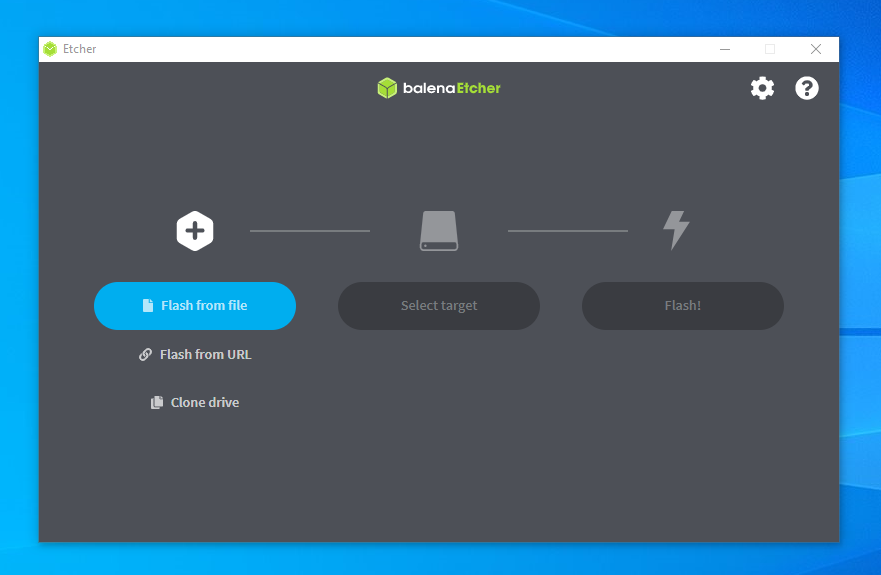
Você seguirá estas etapas:
- Selecione “Flash from file” - você escolherá o arquivo HiveOS baixado (ex. [email protected])
- Em seguida, clique em “Select target” - você escolherá seu SSD externo ou pen drive USB
- Finalize o processo selecionando “Flash!”
É isso! Agora você tem o HiveOS instalado em seu disco inicializável. Temos apenas algumas coisas a configurar em sua conta HiveOS antes de começarmos a minerar, então vamos voltar à sua página de conta.
Configurando Seu Minerador
Na página da sua conta HiveOS, clique no nome da sua fazenda:
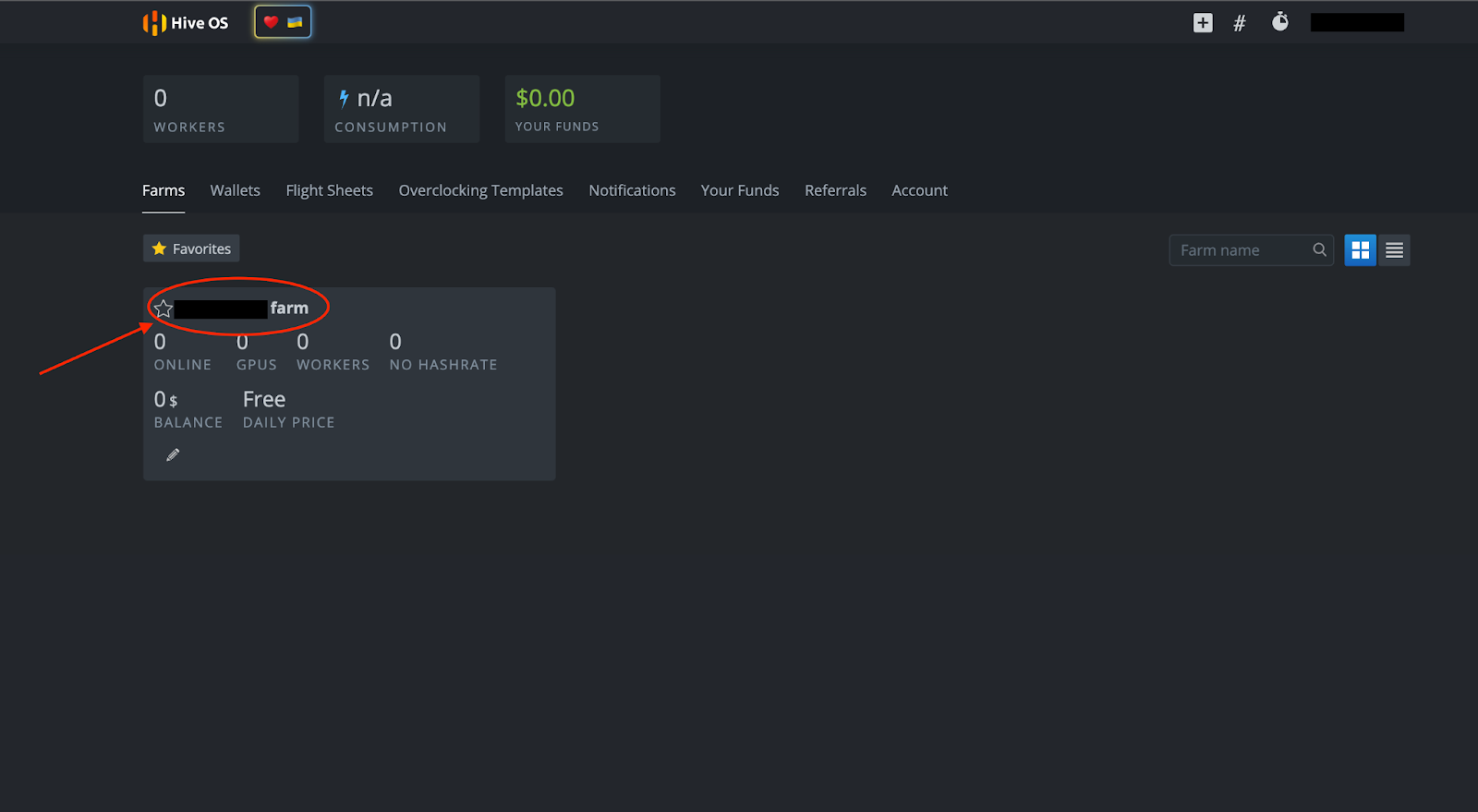
Você verá a seguinte página abaixo. A partir daqui, você pode configurar seu minerador selecionando “+ Adicionar Rig” ou o símbolo “+” no topo da página.
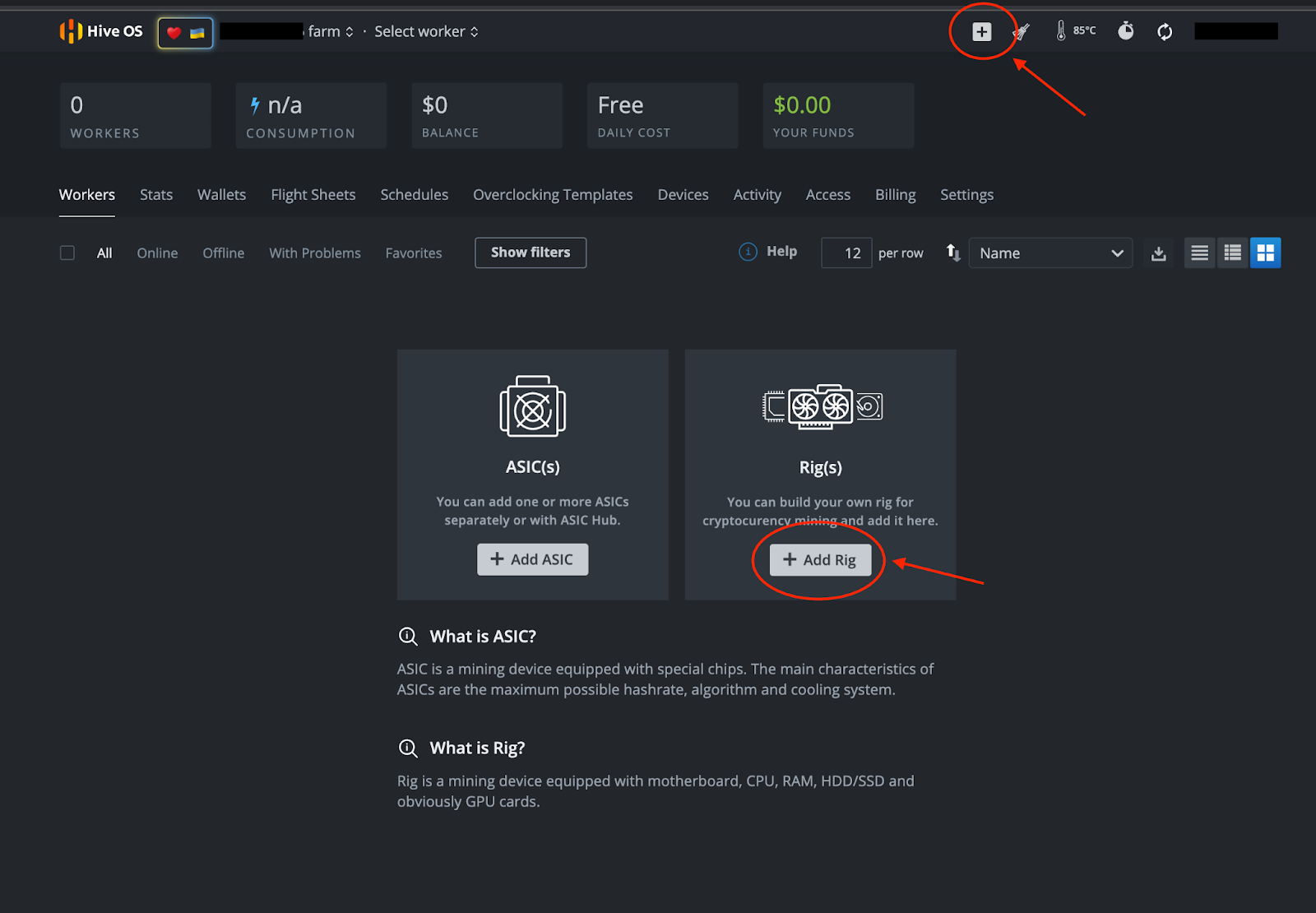
Siga estas etapas:
- Selecione “+ Adicionar Rig”
- Na próxima tela, selecione “Conectar existente”
- IMPORTANTE: Anote o ID do Rig e a senha (você precisará clicar no símbolo do olho para ver a senha) que você vê na próxima página:
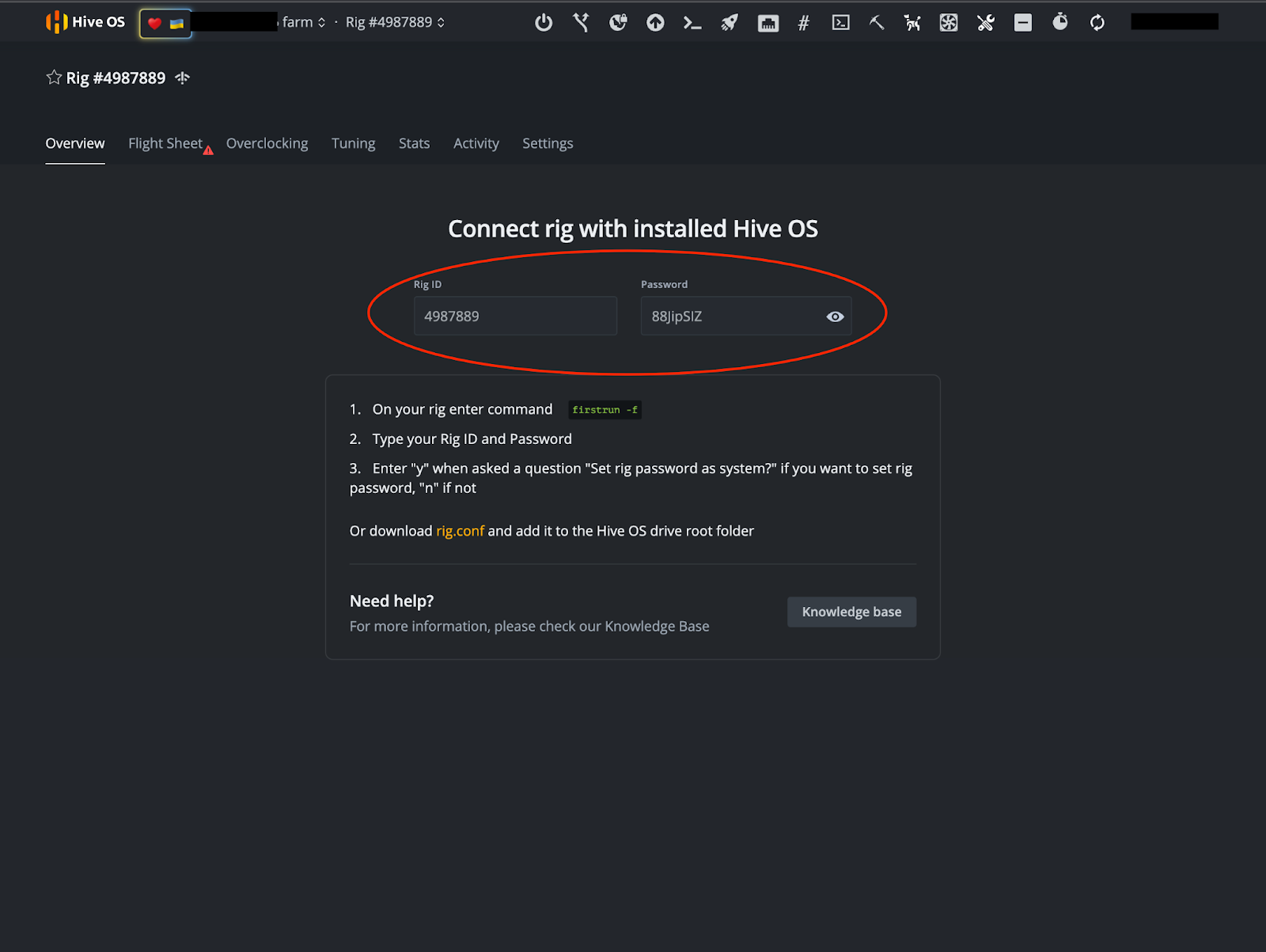
Nota: Esta não é uma conta de demonstração e não é um minerador operacional.
Carteira e Flight Sheet
Depois de anotar seu ID do Rig e Senha, é hora de configurar sua carteira e Flight Sheet. Na imagem acima, você verá uma aba “Flight Sheet” perto do canto superior direito da tela. Depois de selecionar essa aba, você será solicitado a “Ir para a lista.”
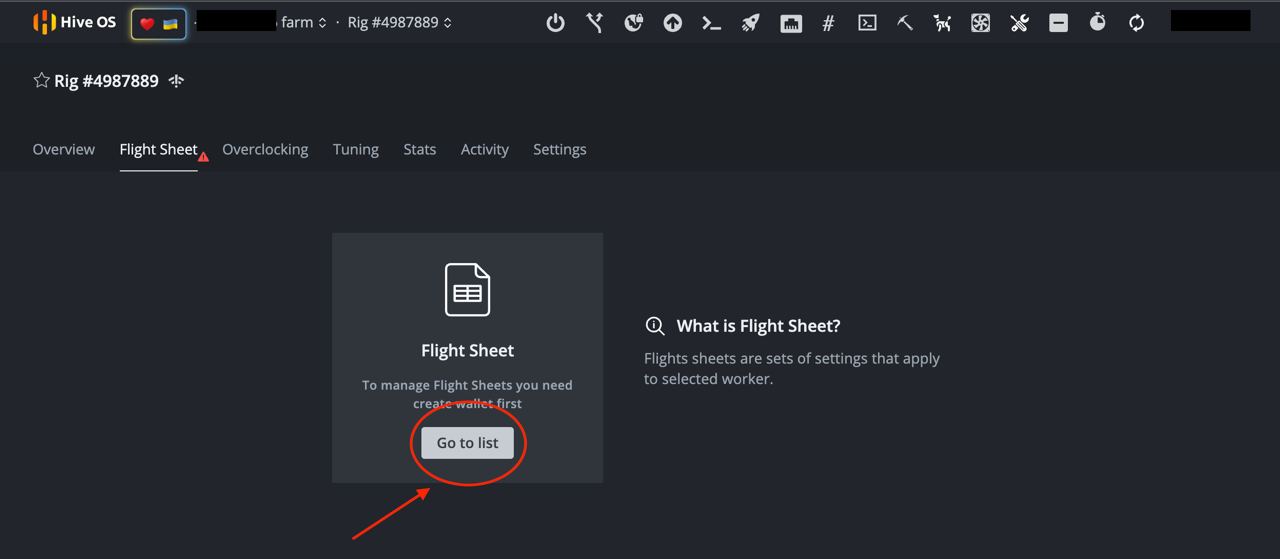
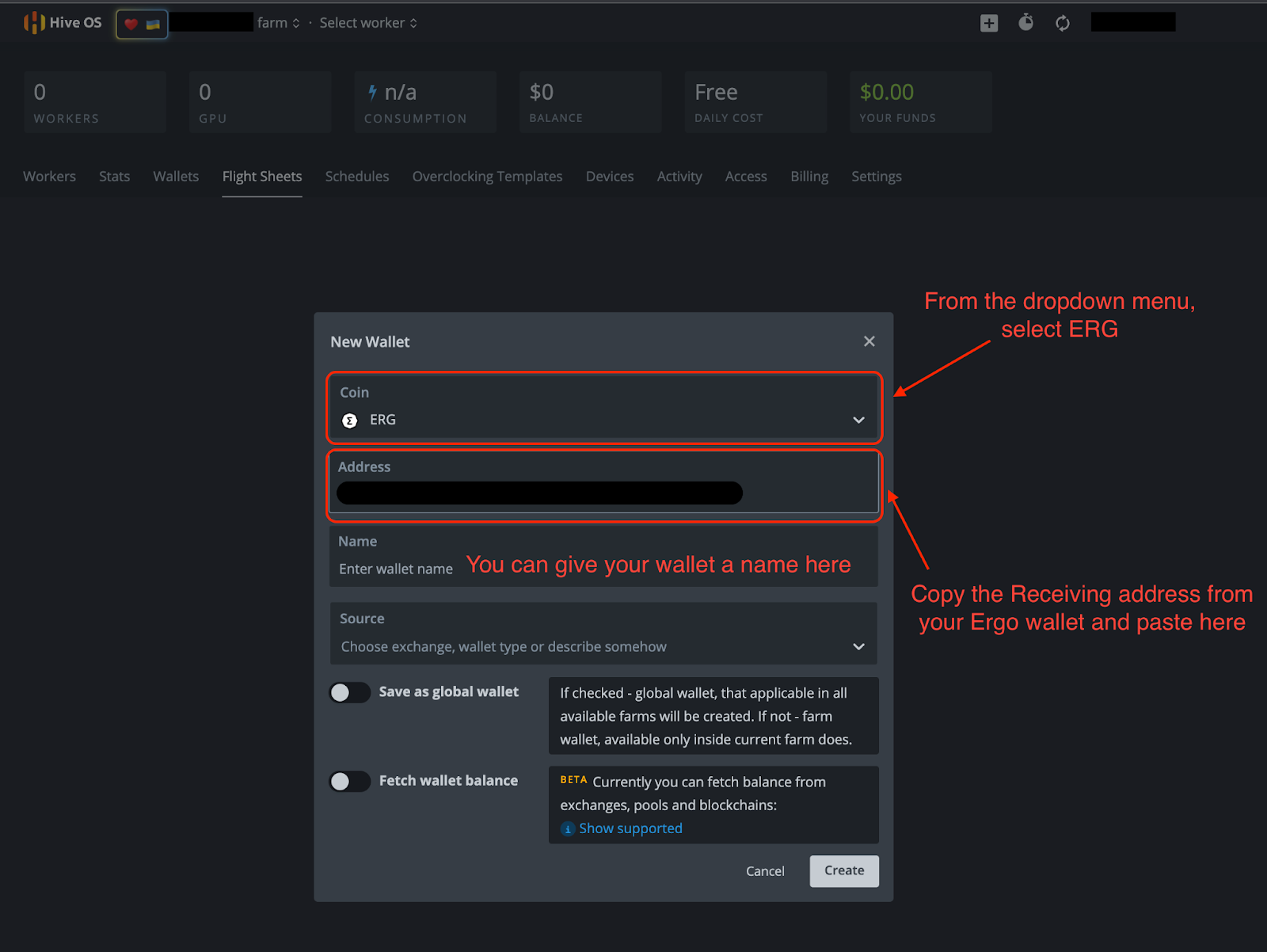
Selecione “Ir para a lista” e clique em “+ Adicionar Carteira.” A partir daí, você preencherá as informações necessárias na imagem abaixo.
- Moeda: ERG
- Endereço: Seu endereço de recebimento da sua carteira Ergo.
- Os outros detalhes são opcionais.
- Clique em “Criar”
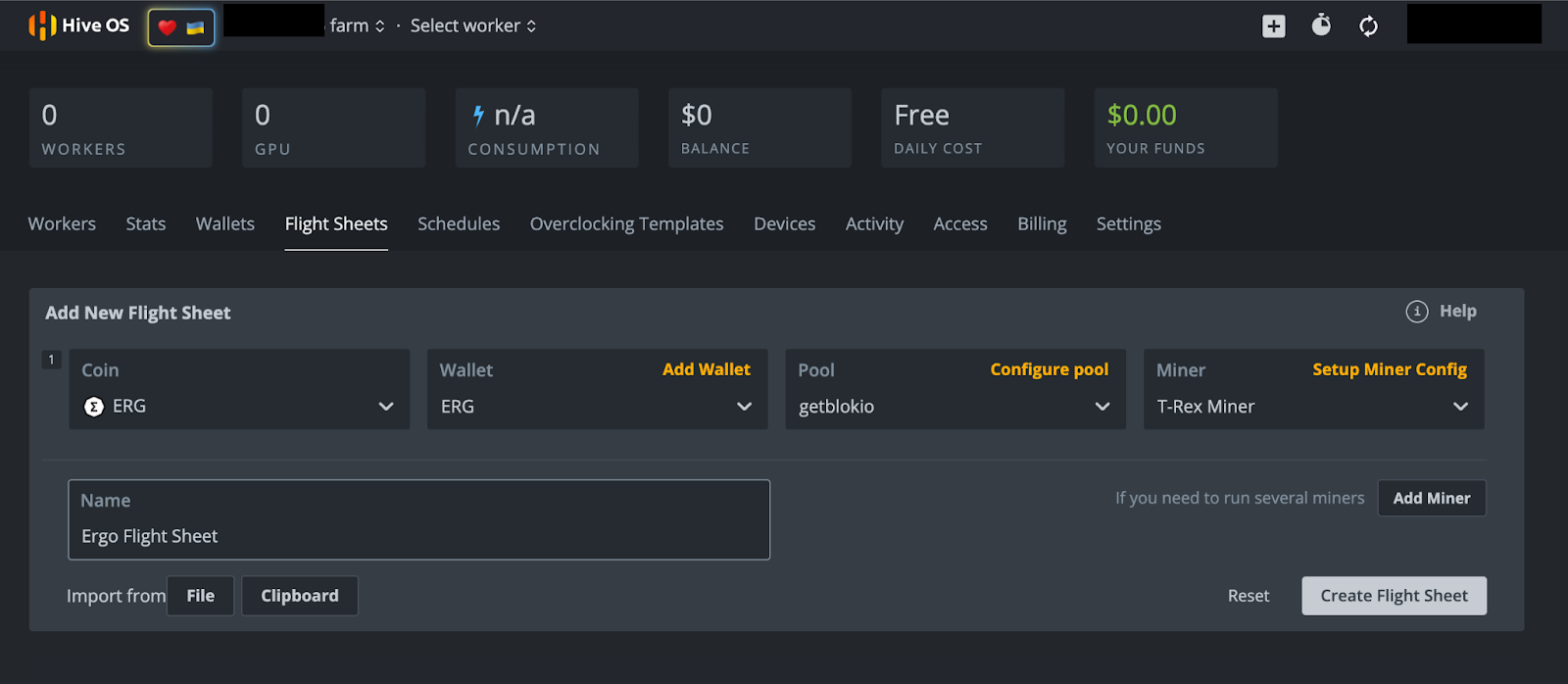
Depois de clicar em “Criar”, você será levado de volta à página do Flight Sheet. A partir daí, selecione a opção “+ Adicionar Flight Sheet” e preencha o seguinte na próxima tela (exemplo na imagem abaixo).
- Moeda: ERG
- Carteira: No menu suspenso, selecione sua carteira Ergo.
- Pool: Você tem várias opções aqui. Este autor selecionou o pool de mineração Getblok, mas você terá vários outros pools para escolher no menu suspenso. Ao escolher um pool, muitas vezes é encorajado escolher um pool menor com menos hashrate do que o maior pool. Isso ajuda a distribuir o hashrate e limitar as chances de um ataque de 51%. Isso pode acontecer se um pool de mineração receber 51% (ou mais) do hashrate da rede, criando um cenário que poderia comprometer a segurança da blockchain.
- Minerador: No menu suspenso, você terá várias opções. Escolha “T-Rex Miner” para GPUs Nvidia ou “TeamRedMiner” para GPUs AMD.
- Nome: Dê um nome ao seu Flight Sheet - pode ser o que você desejar.
- Selecione “Criar Flight Sheet”
Mineração
Vamos minerar!
Se você estiver minerando de um rig, certifique-se de que seu novo disco inicializável HiveOS esteja conectado ao seu rig. Se você estiver usando seu computador pessoal, certifique-se de que seu disco inicializável HiveOS esteja conectado antes de ligar seu computador.
Ligue seu computador e mantenha pressionado o botão para entrar no BIOS. Este botão é tipicamente qualquer um dos seguintes: F1, F2, F10, DELETE ou ESC. Uma vez no BIOS, selecione o disco inicializável HiveOS na opção de Boot. Se você tiver problemas para acessar essas configurações, o seguinte artigo oferece uma visão geral sobre como reiniciar seu computador a partir de outro disco.
Como esta será a primeira vez que você iniciou seu minerador no HiveOS, você precisará inserir o ID do Rig e a Senha que anotou anteriormente. Apenas aguarde o HiveOS terminar de carregar e você será solicitado a essas informações. Se você não for solicitado após esperar alguns minutos, digite “firstrun -f” e pressione ENTER. O sistema operacional perguntará se você deseja alterar a senha do minerador após digitar a senha que foi inicialmente fornecida. Você pode selecionar “Y” (Sim, alterar a senha) ou “N” (não alterar a senha).
Há apenas um último passo e ele requer que você acesse sua conta HiveOS. Se você estava acessando esta conta do computador que está tentando minerar, recomendamos usar o aplicativo móvel HiveOS para acessar sua conta HiveOS.
- Selecione o nome da sua fazenda.
- Selecione o Rig #. Para os propósitos desta demonstração, o número do rig que temos mostrado nas imagens acima é 4987889. Observe que seu número de rig será exclusivo para sua conta HiveOS.
- Selecione a aba “Flight Sheet”.
- Na próxima tela, você verá um símbolo de foguete ao lado do Flight Sheet Ergo que você criou. Clique no foguete para atribuir o flight sheet ao seu minerador.
- Seu minerador agora está minerando Ergo.
Conclusão e Overclocking
Como foi mencionado anteriormente neste artigo, você pode desfrutar de acesso remoto total ao seu minerador pelo aplicativo móvel. Se você se dedicou a configurar este minerador, deve aproveitar ao máximo as capacidades da sua GPU.
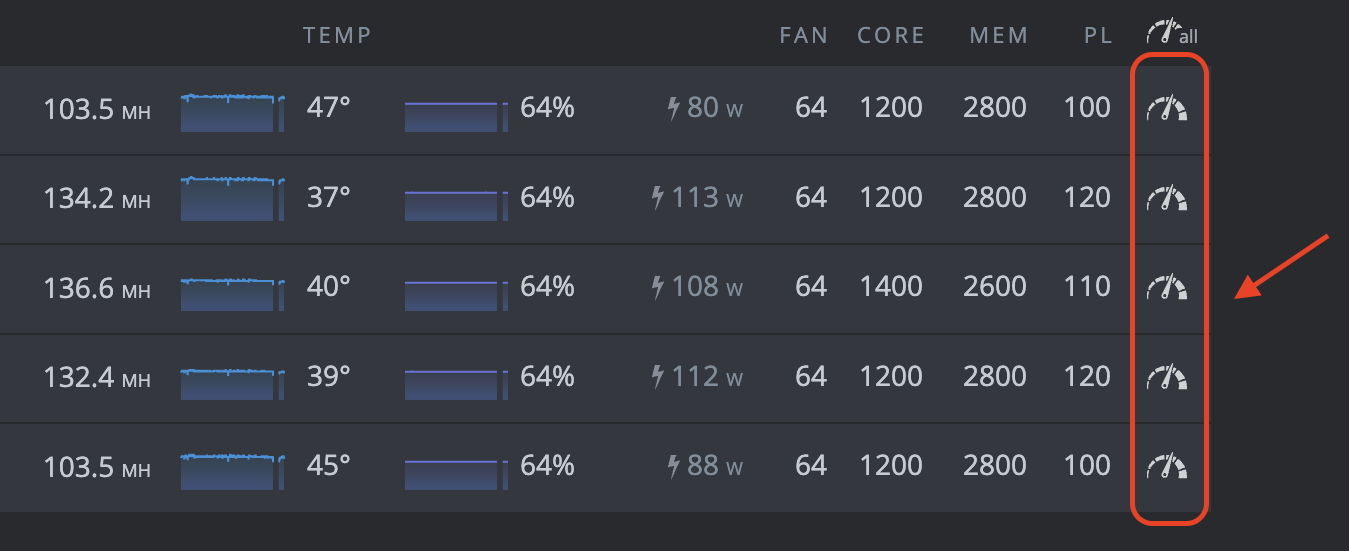
Você pode clicar em qualquer um desses símbolos de relógio para acessar as configurações de overclock para cada uma de suas GPUs. Para guias detalhados de overclocking, consulte o Canal Telegram de Mineração Ergo. Esse canal contém um guia de overclocking nas mensagens fixadas.
É isso! Isso pode parecer muitas etapas, mas uma vez que você tenha tudo configurado, o software HiveOS fornece acesso conveniente ao seu minerador. Boa mineração! Você deve começar a ver ERG depositados em sua carteira Ergo dentro de 1-2 dias (dependendo do seu hashrate).
Share post
13 de agosto de 2025
12 de agosto de 2025


9 de julho de 2025

12 de maio de 2025



7 de abril de 2022

8 de março de 2022