Minando Ergo en HiveOS
22 de marzo de 2022
¿Alguna vez has querido minar Ergo pero pensaste que podrías no tener el conocimiento técnico? Sorprendentemente, no es una actividad tan inaccesible como podrías haber pensado. Ya seas un minero de criptomonedas novato o experimentado, en realidad es bastante fácil minar Ergo. En nuestra publicación anterior del blog, ofrecimos pasos sobre cómo minar Ergo en Windows (Minando Ergo en Windows). Con este artículo, guiaremos a los lectores a través de los pasos para minar Ergo con el popular sistema operativo de minería de criptomonedas, HiveOS.
No necesitas necesariamente tener un equipo de minería para minar Ergo. Si tienes una PC personal con una GPU compatible, puedes minar Ergo fácilmente y ganar ingresos pasivos.
Necesitarás lo siguiente para minar Ergo:
- una computadora (o equipo de minería) con una tarjeta de video GPU que tenga un mínimo de 4GB de RAM (idealmente más si está dentro de tu presupuesto)
- Un SSD externo o una llave USB (mínimo 6 GB) para crear una unidad de arranque - este autor ha tenido más éxito usando HiveOS en un SSD, pero muchos mineros también usan una llave USB.
- una billetera Ergo (como Nautilus)
- una cuenta de HiveOS - te guiaremos a través de la configuración de esto.
Comencemos por obtener tu cuenta de HiveOS.
- Ve al siguiente sitio web: https://the.hiveos.farm/login
- Verás una pantalla de inicio de sesión con el siguiente mensaje debajo: “¿No tienes una cuenta aún? Regístrate”
- Selecciona “Registrarse”
- Una vez que se te pida, completa el formulario con tu correo electrónico, un nombre de inicio de sesión y una contraseña.
Una vez que hayas creado tu cuenta, se te pedirá que verifiques tu correo electrónico y luego se te ofrecerá la oportunidad de habilitar la Autenticación de Dos Factores (2FA) para una mayor seguridad. Cuando termines con 2FA, verás la siguiente pantalla:
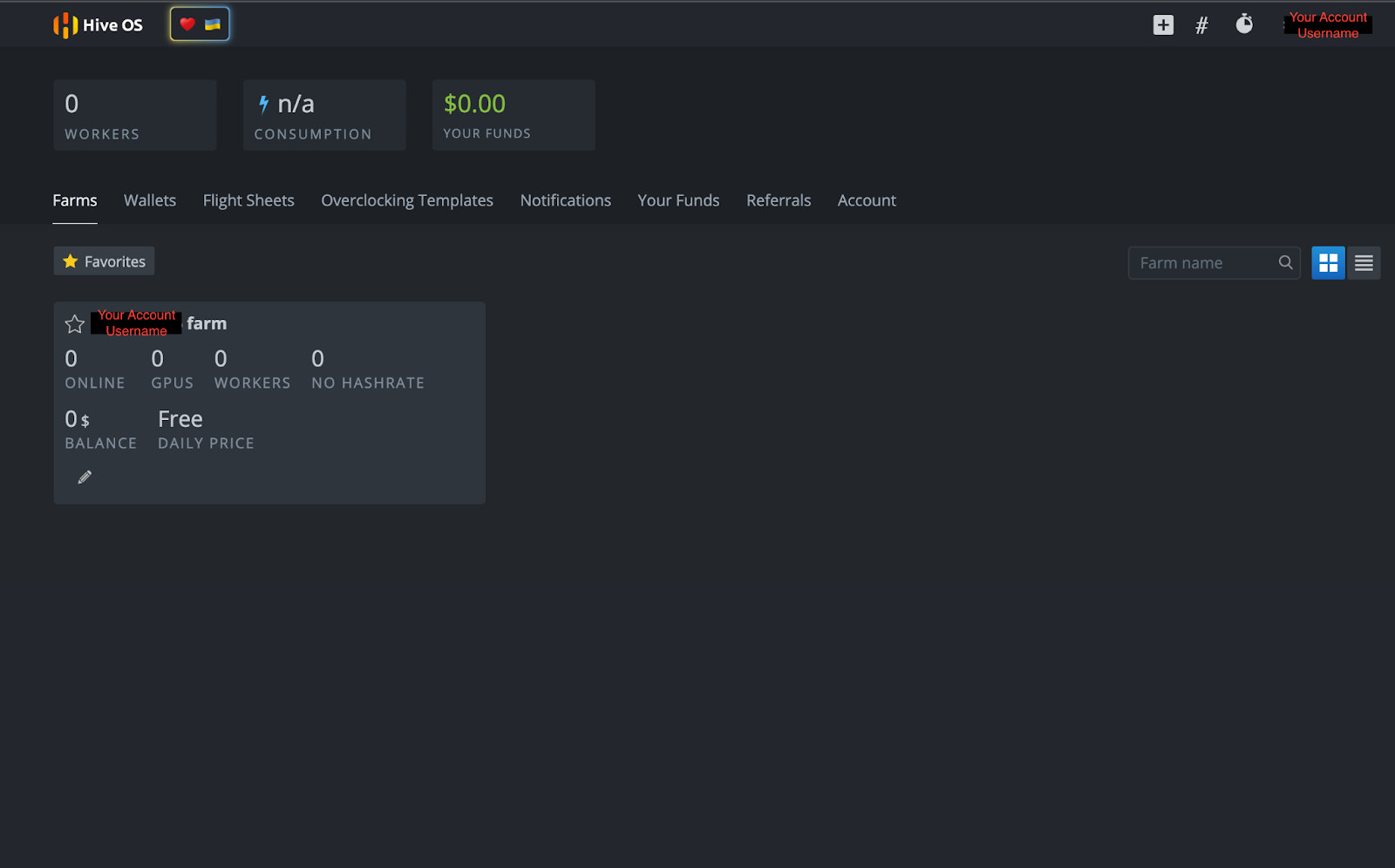
Debido a que HiveOS es un sistema operativo dedicado a la minería de criptomonedas, la interfaz de usuario permite el acceso a numerosas funciones, incluyendo consumo de energía, configuraciones de overclocking, acceso remoto a la energía y otras acciones de minería de criptomonedas. Los usuarios también pueden controlar todas estas funciones de forma remota en un teléfono inteligente con la aplicación HiveOS.
Creando una Unidad de Arranque de HiveOS
Ahora que tienes tu cuenta de HiveOS, necesitas crear una unidad de arranque para el sistema operativo. Ve a https://hiveon.com/install/ y descarga el archivo ZIP en la categoría “GPU”.
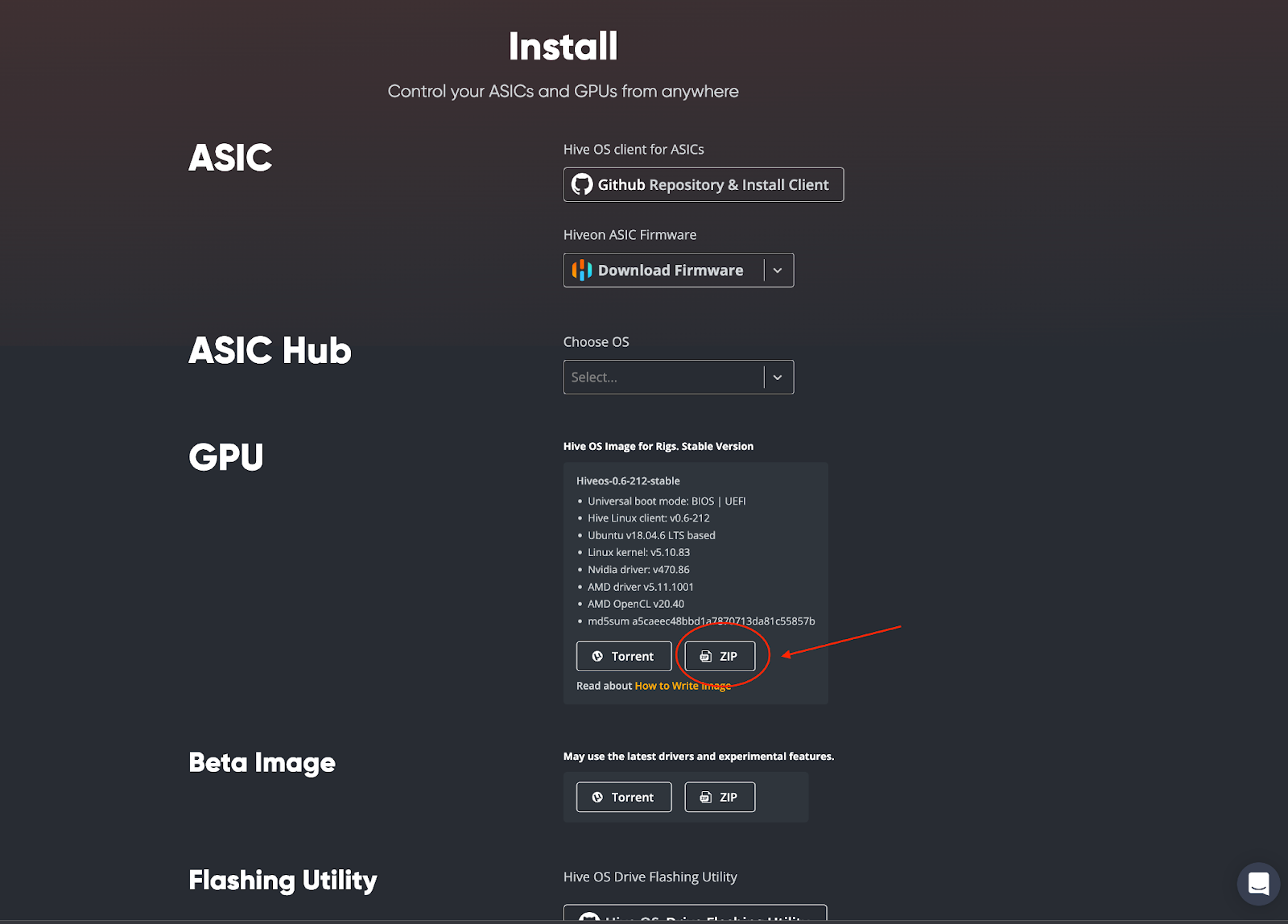
Una vez descargado, necesitarás flashear el sistema operativo en tu SSD externo o llave USB. Este autor eligió usar balenaEtcher para crear la unidad de arranque y los lectores pueden acceder a ese software de código abierto aquí: https://www.balena.io/etcher/. Descarga e instala el software balenaEtcher en tu computadora. Una vez completado, abre balenaEtcher en tu computadora. Verás la siguiente pantalla:
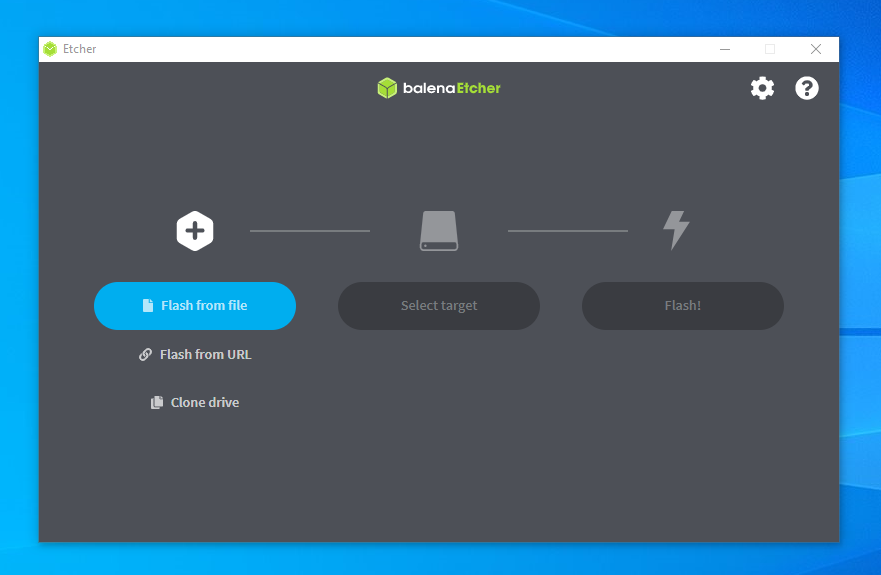
Luego seguirás estos pasos:
- Selecciona “Flashear desde archivo” - elegirás el archivo de HiveOS descargado (ej. [email protected])
- Luego haz clic en “Seleccionar destino” - elegirás tu SSD externo o llave USB
- Termina el proceso seleccionando “¡Flashear!”
¡Eso es todo! Ahora tienes HiveOS instalado en tu unidad de arranque. Solo nos quedan algunas cosas por configurar en tu cuenta de HiveOS antes de que podamos comenzar a minar, así que volvamos a tu página de cuenta.
Configurando Tu Minero
En la página de tu cuenta de HiveOS, haz clic en el nombre de tu granja:
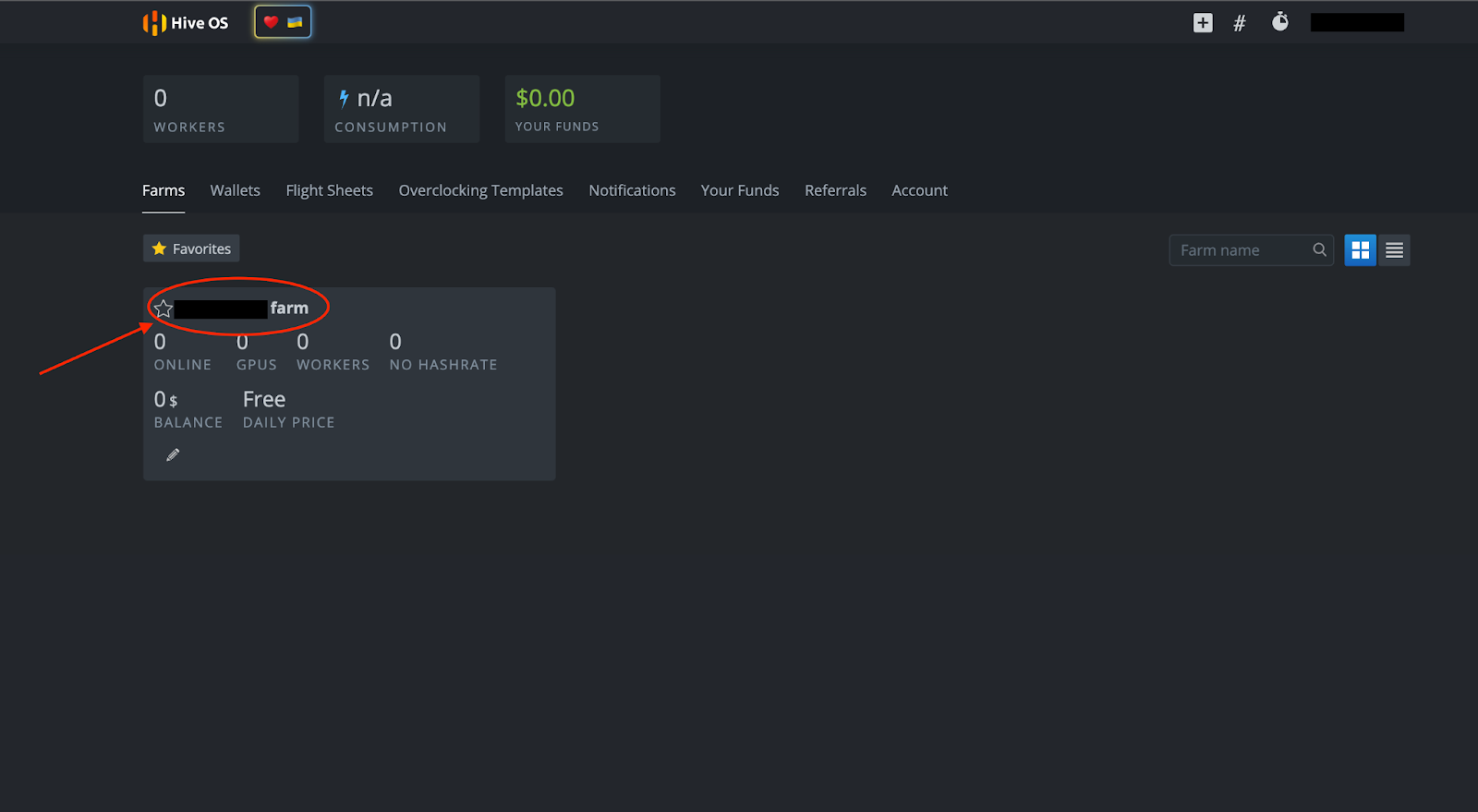
Verás la siguiente página a continuación. Desde aquí puedes configurar tu minero seleccionando “+ Agregar Rig” o el símbolo “+” en la parte superior de la página.
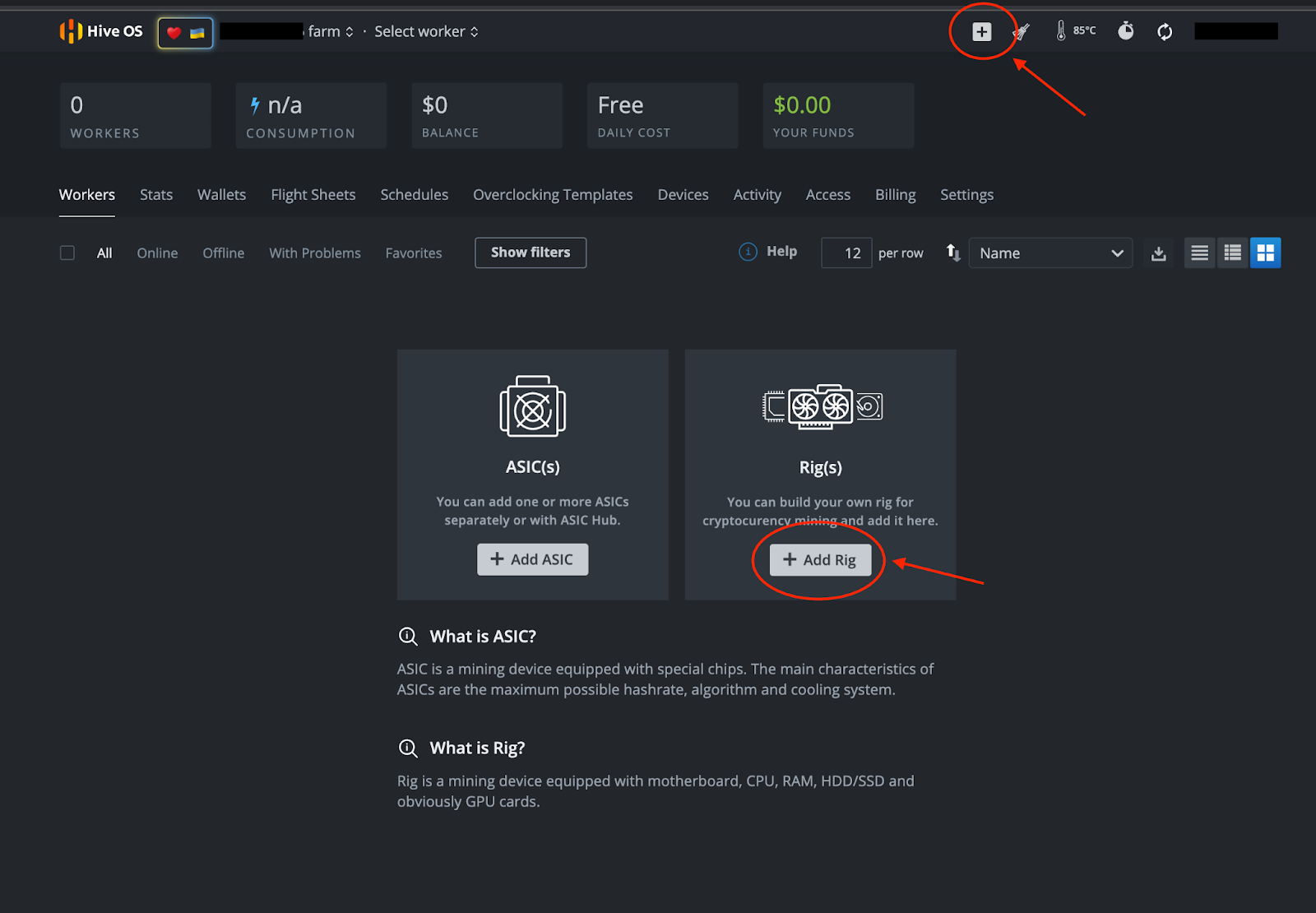
Sigue estos pasos:
- Selecciona “+ Agregar Rig”
- En la siguiente pantalla, selecciona “Conectar existente”
- IMPORTANTE: Anota el ID del Rig y la contraseña (necesitarás hacer clic en el símbolo del ojo para ver la contraseña) que ves en la siguiente página:
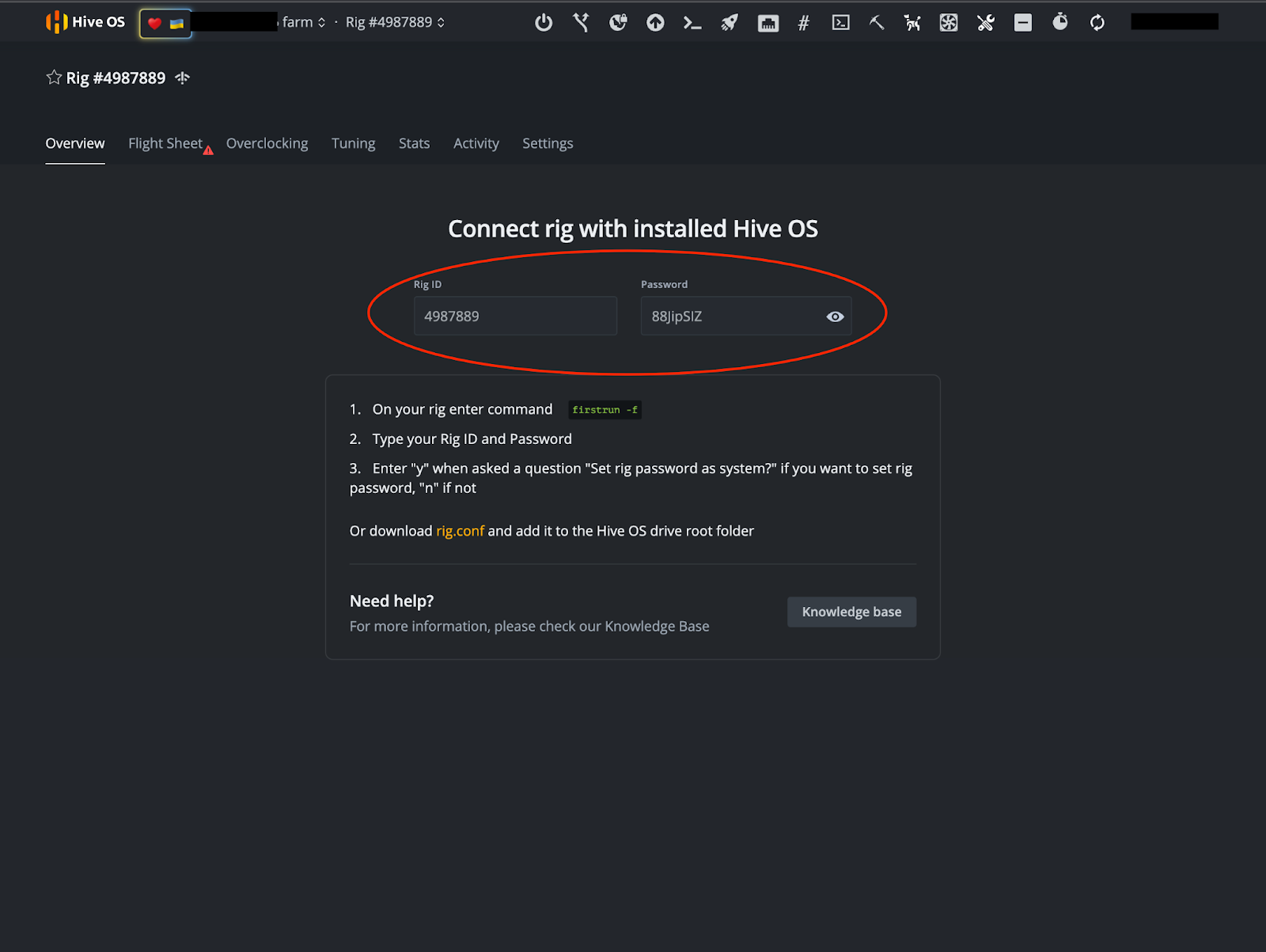
Nota: Esta no es una cuenta de demostración y no es un minero operativo.
Billetera y Hoja de Vuelo
Una vez que hayas anotado tu ID de Rig y Contraseña, es hora de configurar tu billetera y Hoja de Vuelo. En la imagen anterior, verás una pestaña “Hoja de Vuelo” cerca de la parte superior derecha de la pantalla. Después de seleccionar esa pestaña, se te pedirá que “Vayas a la lista.”
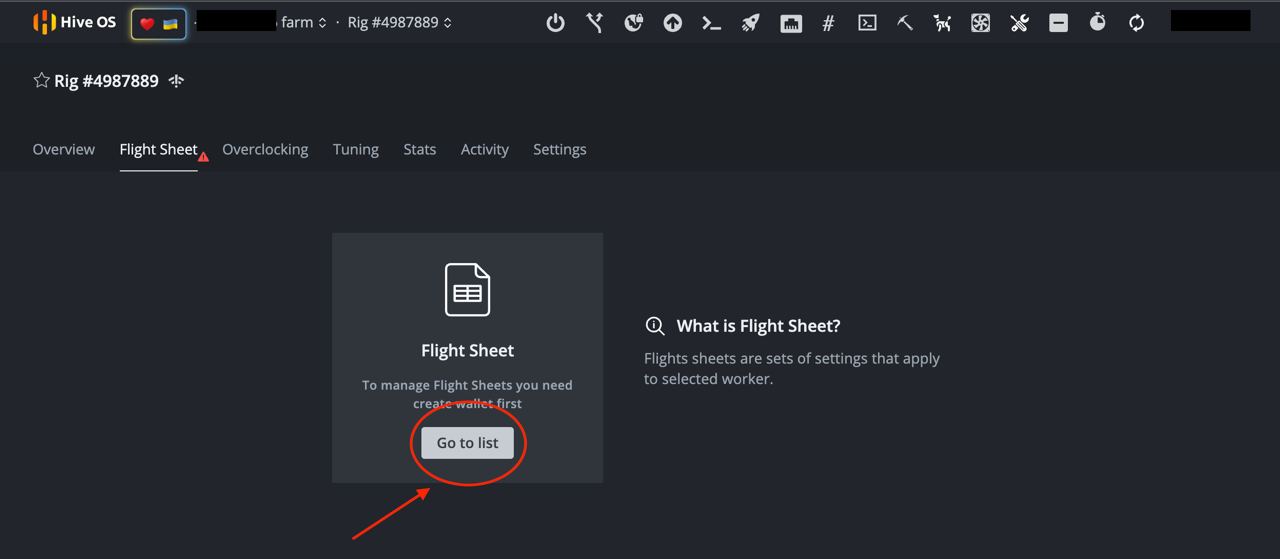
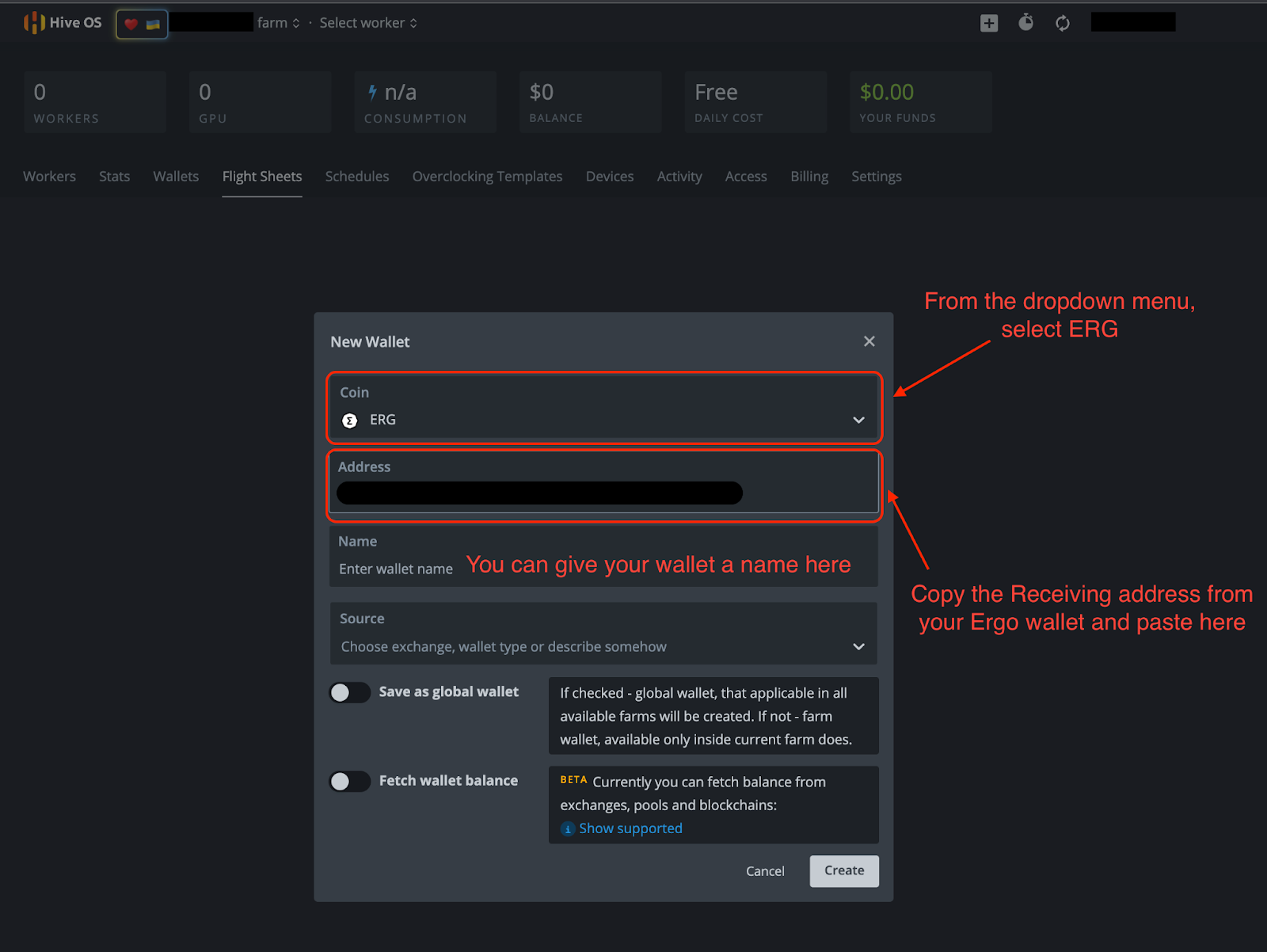
Selecciona “Ir a la lista” y haz clic en “+ Agregar Billetera.” Desde allí, completarás la información necesaria en la imagen a continuación.
- Moneda: ERG
- Dirección: Tu dirección de recepción de tu billetera Ergo.
- Los otros detalles son opcionales.
- Haz clic en “Crear”
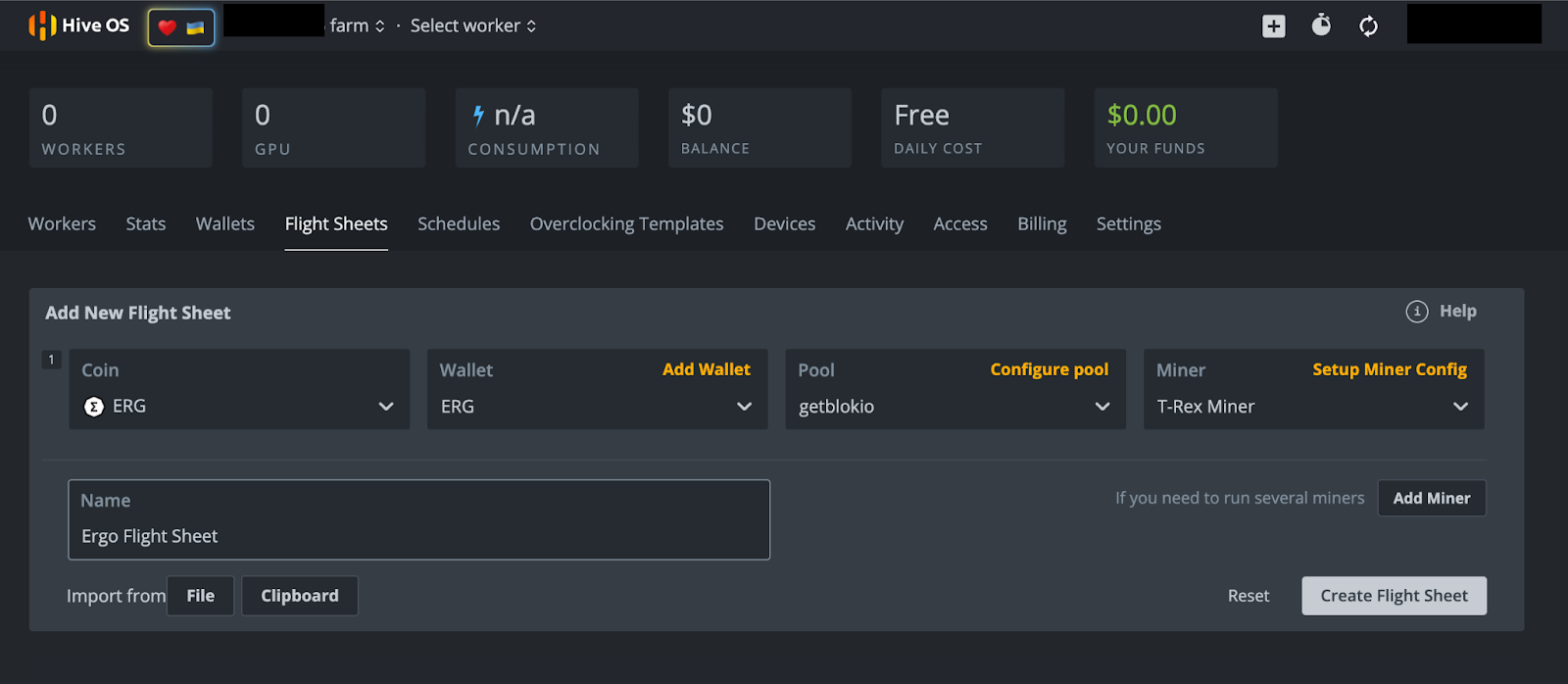
Después de hacer clic en “Crear,” serás llevado de regreso a la página de Hoja de Vuelo. Desde allí, selecciona la opción “+ Agregar Hoja de Vuelo” y completa lo siguiente en la siguiente pantalla (ejemplo en la imagen a continuación).
- Moneda: ERG
- Billetera: Desde el menú desplegable selecciona tu billetera Ergo.
- Pool: Tienes numerosas opciones aquí. Este autor ha seleccionado el pool de minería Getblok, pero tendrás varios otros pools para elegir en el menú desplegable. Al elegir un pool, a menudo se recomienda elegir un pool más pequeño con menos hashrate que el pool más grande. Esto ayuda a distribuir el hashrate y limitar las posibilidades de un ataque del 51%. Esto puede suceder si un pool de minería recibe el 51% (o más) del hashrate de la red, creando un escenario que podría comprometer la seguridad de la blockchain.
- Minero: Desde el menú desplegable tendrás varias opciones. Elige “T-Rex Miner” para GPUs Nvidia o “TeamRedMiner” para GPUs AMD.
- Nombre: Dale un nombre a tu Hoja de Vuelo - puede ser lo que desees.
- Selecciona “Crear Hoja de Vuelo”
Minando
¡Vamos a minar!
Si estás minando desde un rig, asegúrate de que tu nueva unidad de arranque de HiveOS esté conectada a tu rig. Si estás usando tu computadora personal, asegúrate de tener tu unidad de arranque de HiveOS conectada antes de encender tu computadora.
Enciende tu computadora y mantén presionado el botón para ingresar a la BIOS. Este botón suele ser cualquiera de los siguientes: F1, F2, F10, DELETE o ESC. Una vez que estés en la BIOS, selecciona la unidad de arranque de HiveOS en la opción de Arranque. Si tienes problemas para acceder a estas configuraciones, el siguiente artículo ofrece una visión general sobre cómo reiniciar tu computadora desde otra unidad.
Dado que esta será la primera vez que inicies tu minero en HiveOS, necesitarás ingresar el ID del Rig y la Contraseña que anotaste anteriormente. Solo espera a que HiveOS termine de cargar y se te pedirá esa información. Si no se te solicita después de esperar unos minutos, escribe “firstrun -f” y presiona ENTER. El sistema operativo preguntará si deseas cambiar la contraseña de tu minero después de que ingreses la contraseña que se proporcionó inicialmente. Puedes seleccionar “Y” (Sí, cambiar contraseña) o “N” (no cambiar contraseña).
Solo hay un último paso y requiere que ingreses a tu cuenta de HiveOS. Si estabas accediendo a esta cuenta desde la computadora desde la que intentas minar, te recomendamos usar la aplicación móvil de HiveOS para acceder a tu cuenta de HiveOS.
- Selecciona el nombre de tu granja.
- Selecciona el Rig #. Para los propósitos de esta demostración, el número de rig que hemos estado mostrando en las imágenes anteriores es 4987889. Ten en cuenta que tu número de rig será único para tu cuenta de HiveOS.
- Selecciona la pestaña “Hoja de Vuelo”.
- En la siguiente pantalla, verás un símbolo de cohete junto a la Hoja de Vuelo de Ergo que creaste. Haz clic en el cohete para asignar la hoja de vuelo a tu minero.
- Tu minero ahora está minando Ergo.
Conclusión y Overclocking
Como se mencionó anteriormente en este artículo, puedes disfrutar de acceso remoto completo a tu minero desde la aplicación móvil. Si has tomado el tiempo para configurar este minero, deberías aprovechar al máximo las capacidades de tu GPU.
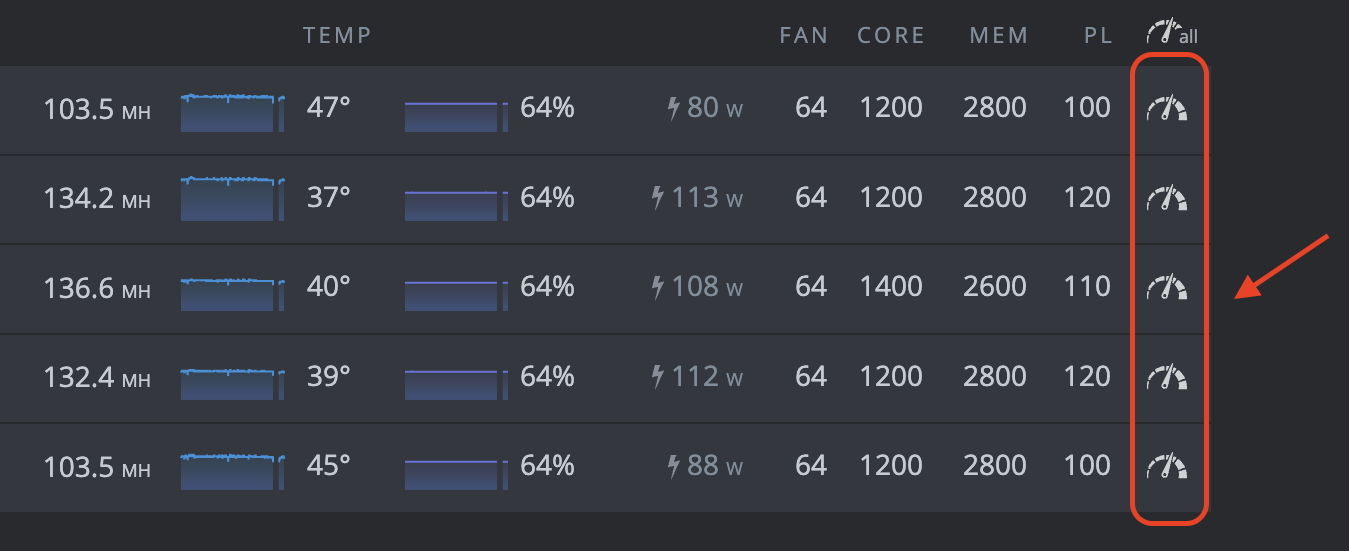
Puedes hacer clic en cualquiera de estos símbolos de reloj para acceder a las configuraciones de overclocking para cada una de tus GPUs. Para guías de overclocking detalladas, consulta el Canal de Telegram de Minería de Ergo. Ese canal contiene una guía de overclocking en los mensajes fijados.
¡Eso es todo! Esto puede parecer muchos pasos, pero una vez que tengas todo configurado, el software de HiveOS proporciona acceso conveniente a tu minero. ¡Feliz minería! Deberías comenzar a ver ERG depositados en tu billetera Ergo dentro de 1-2 días (dependiendo de tu hashrate).
Share post
13 de agosto de 2025
12 de agosto de 2025



9 de julio de 2025

12 de mayo de 2025



9 de febrero de 2022

8 de febrero de 2022

5 de febrero de 2022

1 de febrero de 2022

27 de enero de 2022
20 de enero de 2022

18 de enero de 2022
6 de enero de 2022
4 de enero de 2022


30 de diciembre de 2021

28 de diciembre de 2021
23 de diciembre de 2021